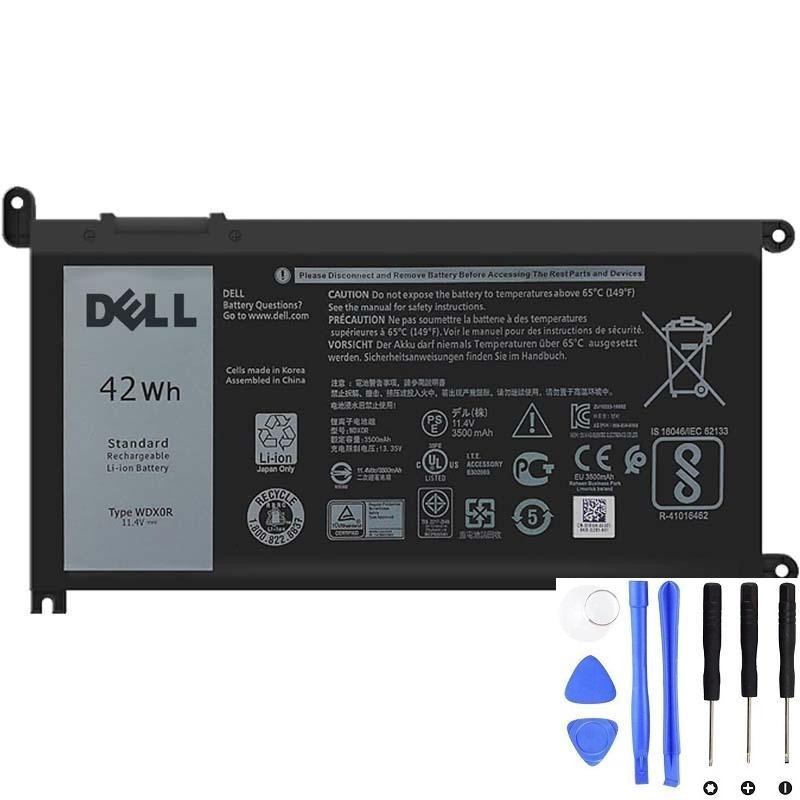
If your Inspiron/Latitude/Vostro no longer holds a charge, there’s a good chance your machine uses the Dell WDX0R (WDXOR) 42Wh battery. This guide distills everything buyers actually need: what WDX0R is, how it differs from 33YDH/YRDD6, how to confirm compatibility, and the safest way to replace and calibrate.
Buy WDX0R 42Wh Battery
Jump to sections ↓
- TL;DR quick answers
- What exactly is WDX0R (WDXOR)?
- Specs quick sheet
- WDX0R vs 33YDH vs YRDD6 (read before you buy)
- Common compatible part numbers (aliases)
- Typical laptop families using WDX0R
- 3 ways to confirm compatibility
- Safe replacement & battery calibration
- After-replacement troubleshooting
- Where to buy
- FAQs
TL;DR quick answers
- WDX0R = WDXOR (digit “0” vs letter “O”).
- It’s a 42Wh, 11.4V, 3-cell internal battery used by many Inspiron/Latitude/Vostro models.
- Do not assume WDX0R and 33YDH/YRDD6 are interchangeable—some machines shipped in two configurations; brackets/housings can differ.
- Best confirmation: battery label inside the chassis or BIOS/Service Tag lookup.
What exactly is WDX0R (WDXOR)?
WDX0R is a Dell battery part number (often typed as WDXOR due to “0/O” confusion). It identifies a 42Wh, 11.4V, 3-cell Li-ion pack fitted to numerous 13–17-inch Dell laptops, especially popular Inspiron 5000/7000 2-in-1 lines and selected Latitude/Vostro models.
Specs quick sheet
| Part number family | WDX0R (aka WDXOR) |
|---|---|
| Voltage | 11.4V (nominal) |
| Capacity | 42Wh (typical) |
| Cell count | 3-cell (Li-ion) |
| Typical use | Inspiron 5000/7000 2-in-1; selected Inspiron 15/17, Latitude 3000 series, Vostro 5000 |
| Aliases | See compatible part numbers |
WDX0R vs 33YDH vs YRDD6 (read before you buy)
Many buyers ask whether they can swap a 56Wh pack (e.g., 33YDH) or another part (e.g., YRDD6) into a laptop that originally shipped with WDX0R. The short answer: sometimes, but not as a universal rule.
| Part | Voltage | Capacity | Cells |
|---|---|---|---|
| WDX0R / WDXOR | 11.4V | 42Wh | 3-cell |
| 33YDH | 11.4V | 56Wh | 4-cell |
| YRDD6 | Varies by batch | Varies | Varies |
Common compatible part numbers (aliases)
Searchers and sellers frequently reference WDX0R with alternate codes. The following PNs are commonly associated with the WDX0R family in listings and documentation:
- WDX0R / WDXOR (same family; 0 ↔ O)
- 0WDX0R (leading zero format)
- 3CRH3, T2JX4, FC92N, C4HCW, CYMGM (seen as replacements/aliases in marketplace catalogs)
Note: Different resellers may reference these aliases slightly differently. The safest match is your label + voltage + Wh.
Typical laptop families using WDX0R
The WDX0R appears in a wide range of models. The list below is indicative (not exhaustive) and focuses on families buyers most commonly search for. If your exact sub-model isn’t listed, use the confirmation steps.
Inspiron (examples)
- 13-5368 / 5378 / 7378 (2-in-1)
- 15-5568 / 5570 / 5578 / 5579
- 17-5765 / 5770
Latitude / Vostro (examples)
- Latitude 3480 / 3490 / 3500 / 3580 / 3590
- Vostro 5468 / 5471
3 ways to confirm compatibility (do this first)
- Battery label check (best): Power off, disconnect charger, open the bottom cover carefully. Read the printed part number on the battery: look for WDX0R (or WDXOR), voltage 11.4V, and capacity around 42Wh.
- BIOS / SupportAssist: Enter BIOS/UEFI or Dell SupportAssist to view battery info. Some models expose part family or capacity details that corroborate your label.
- Service Tag lookup: On Dell Support, enter your Service Tag to see original configuration. Cross-check whether your model came with the 42Wh pack vs a 56Wh option.
If your original pack is swollen, do not continue using it. Replace promptly and follow safe battery handling.
Safe replacement & battery calibration
Before you start
- Shut down the laptop completely and unplug the AC adapter.
- Use an ESD-safe workspace; keep track of screws and clips.
- If your model includes an internal battery-disconnect switch in BIOS, use it before opening.
Typical steps (summary)
- Remove the bottom cover (Torx/Phillips depending on model).
- Locate the battery pack; disconnect the battery cable from the mainboard first.
- Unscrew the battery; gently lift it out, minding any tape or guide tabs.
- Seat the new WDX0R battery; screw in place to the specified torque.
- Reconnect the battery cable, reattach the cover, and boot.
Calibrate the new battery
- Charge to 100%, keep charging for an additional 30–60 minutes.
- Use on battery to ~10–15%, then recharge to 100% without interruption.
- Repeat once if the reported percentage seems inconsistent.
After-replacement troubleshooting
- “Plugged in, not charging”: Reseat the battery connector; update BIOS; power-cycle with AC removed; try a different known-good AC adapter.
- Battery drains quickly: Check background tasks; verify that Windows/BIOS power profiles aren’t set to high-performance permanently; complete calibration cycles.
- System won’t power on: Confirm all internal flex cables were reconnected; disconnect AC/battery, hold power for 30 seconds, reconnect battery then AC.
Where to buy the WDX0R 42Wh battery
For a ready-to-install replacement that matches the specs in this guide, see the product page below. You’ll find current pricing, stock, shipping, and warranty details:
Dell WDX0R (WDXOR) 42Wh Battery — View & Buy
If you’re still unsure about cross-compatibility with 33YDH/YRDD6, contact support with your model name and a clear photo of the original battery label.