Shipped with Windows 10 Home, Intel Core i5 8th-gen CPU, 8GB DDR4 memory, and a 1TB HDD, it provides a solid foundation for everyday work,
streaming, and note-taking with pen support. In this guide, we’ll explore its original configuration, practical upgrade paths,
and a full list of Dell part numbers to help you source compatible components and accessories.
Original Configuration
- CPU: Intel Core i5-8250U (8th Gen, Kaby Lake-R)
- Memory: 8GB DDR4-2400 (1×8GB, single-channel)
- Storage: 1TB 5400 rpm HDD (2.5″, SATA)
- Display: 15.6” FHD (1920×1080) IPS Touchscreen, AUO panel, IR camera (Windows Hello)
- Graphics: Integrated Intel UHD Graphics 620
- Battery: 42Wh, 3-cell Lithium (Dell part Y3F7Y / WDX0R compatible)
- Adapter: 45W Lite-On AC adapter (4.5mm barrel)
- Wireless: Dell DW1820 M.2 WLAN card (worldwide)
- OS: Windows 10 Home 64-bit, Dell factory software suite
Recommended Upgrades
Upgrading the Inspiron 15 5579 boosts performance and extends usability. Here are the key upgrades:
- Storage: Replace the 1TB HDD with a SATA SSD (2.5″) — the fastest way to improve boot times and responsiveness.
- Memory: Add a second 8GB DDR4-2400 SODIMM to unlock dual-channel performance (max supported 32GB).
- Battery: Replace the original 42Wh pack when runtime shortens (see our battery recommendation below).
🔋 Battery Replacement Recommendation
If your Dell Inspiron 15 5579 no longer holds charge as it used to, it’s time to replace the battery.
We recommend the Dell WDX0R 42Wh Battery, which is fully compatible with the Inspiron 15 5579 and other Dell 5000/7000 series laptops.
It matches the original factory specification (42Wh, 3-cell Lithium) and ensures safe, reliable performance.
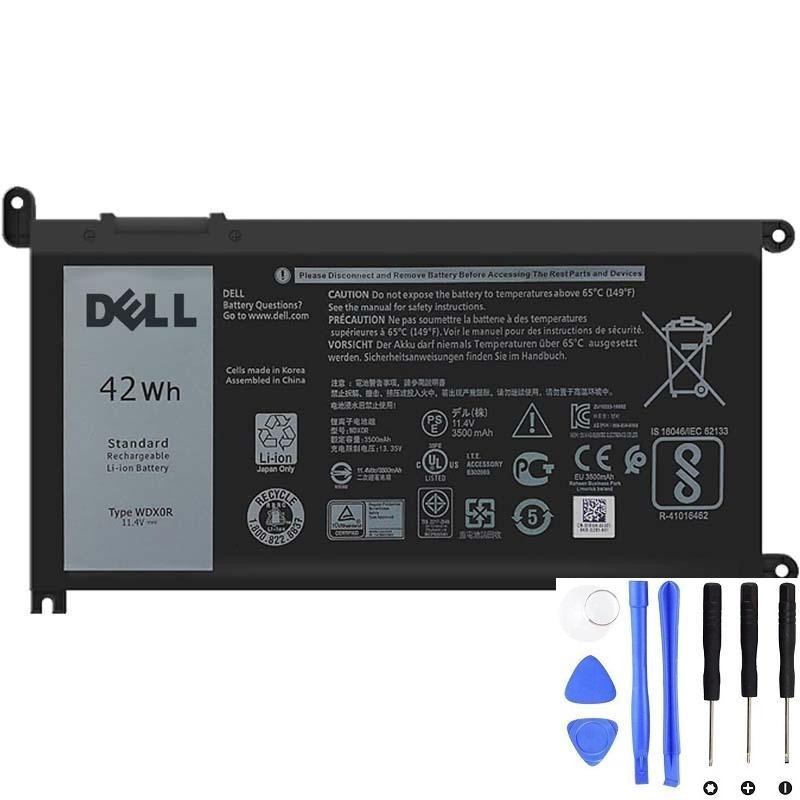
Buy the Dell WDX0R 42Wh Battery here
Full Part Numbers List (Factory Build)
Below are the factory part numbers associated with this Inspiron 15 5579 configuration. Use these for sourcing spares, upgrades, or verifying compatibility:
HJPTM / Y3F7Y : Battery, Primary 42Wh, 3C, Lithium
KXTTW : Adapter, 45W LiteOn, 4.5mm
2J7C1 : HDD, 1TB, 5400 rpm, 2.5"
0079Y : LCD, 15.6 FHD IPS Touch AUO
PF7X5 : LCD Cover Kit with IR
NVH0J : Assembly, IR Camera
MKYF9 : DIMM, 8GB DDR4-2400
D4V21 : Wireless Card, M.2, DW1820
(… full list available in Dell factory configuration report)
Buying Advice
Always confirm compatibility with part numbers before ordering replacements. For batteries, choose the WDX0R 42Wh —
it’s the direct replacement for the Inspiron 15 5579. For performance, prioritize adding an SSD and expanding RAM to 16GB.
Conclusion
With simple upgrades — SSD, memory, and a fresh Dell WDX0R battery — your Inspiron 15 5579 2-in-1 can feel brand new again.
Follow the part numbers listed above for safe buying decisions, and enjoy years of extended performance.