If your Dell laptop uses a WDX0R (42Wh) battery and the battery percentage jumps (for example 60% → 25%) or looks inaccurate, it usually means the laptop’s battery “fuel gauge” estimate no longer matches the battery’s real behavior.
Sometimes this is a calibration/reporting issue. But very often, sudden percentage jumps are an early warning sign of a worn or unstable battery.
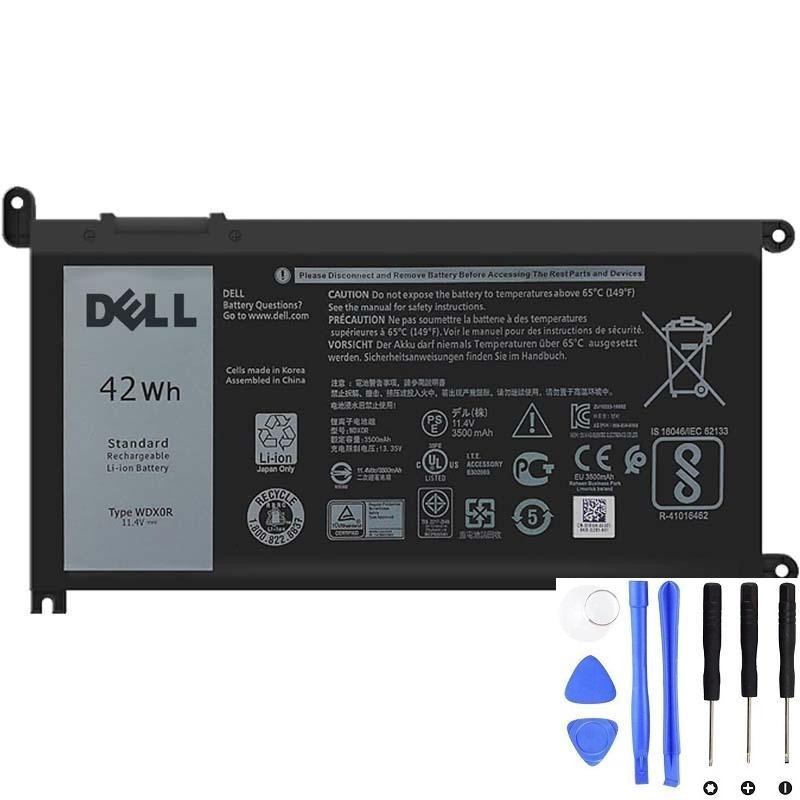
If % jumps plus shutdowns/fast drain, replacement is often the best fix.
1) What “battery percentage” really means
The percentage you see in Windows is not a direct measurement of “energy left.” It’s an estimate based on:
- Battery voltage behavior
- Current draw (how much power the laptop is using)
- Battery controller readings
- Calibration history (what the system has learned over time)
When the estimate becomes unreliable, the percentage can jump.
2) The most common reasons WDX0R percentages jump
A) Battery wear (capacity loss + higher internal resistance)
As the battery ages, it holds less charge and its internal resistance rises. Under load, voltage can drop quickly, and Windows “corrects” the estimate—sometimes suddenly.
Common signs:
- Jumps happen more during heavy tasks
- Battery drains fast even after a full charge
- Sometimes the laptop shuts down with charge left
B) Cell imbalance inside the pack
The pack contains multiple cell groups. If one group becomes weaker, the battery can hit low-voltage cutoff early, causing percentage jumps and instability.
C) Fuel-gauge calibration drift
If you keep the laptop plugged in most of the time (or always discharge within a narrow range), the fuel gauge can “drift” and become inaccurate.
D) Sleep/standby drain (Modern Standby behavior)
If the laptop drains while sleeping, the system may wake up to a different battery state and update the percentage abruptly.
E) BIOS/driver reporting issues
Sometimes after Windows/BIOS updates, battery reporting can become inconsistent until the power controller resets.
3) Quick proof: check real battery health in Windows
powercfg /batteryreportOpen the report and compare:
- DESIGN CAPACITY
- FULL CHARGE CAPACITY
If full charge capacity is much lower than design capacity, the battery is worn and percentage jumps are more likely.
4) Step-by-step fixes to try (safe and practical)
Step 1: Power reset (fast “glitch fix”)
- Shut down the laptop.
- Unplug the charger.
- Hold the power button for 30 seconds.
- Plug in and start normally.
Step 2: Reinstall Windows battery drivers
- Open Device Manager
- Expand Batteries
- Uninstall:
- Microsoft AC Adapter
- Microsoft ACPI-Compliant Control Method Battery
- Restart (Windows reinstalls them automatically)
Step 3: Do one calibration cycle (do rarely)
If there are no safety signs (no swelling/odor/abnormal heat), you can do one controlled cycle:
- Charge to 100%
- Use down to about 10–15% (avoid forcing it to 0%)
- Charge back to 100% in one session
Note: Calibration may improve readings, but it won’t restore lost capacity.
Step 4: Update BIOS/chipset/power drivers
If jumps started after an update, updating BIOS and power drivers from Dell support can help stabilize reporting.
5) When incorrect percentage means you should replace the battery
Replacing the WDX0R battery is strongly recommended if you have % jumps plus any of these:
- Random shutdowns with battery % remaining
- Fast drain even under light use
- Battery report shows a large capacity drop
- Dell diagnostics reports battery end-of-life/failures
- Swelling (replace ASAP for safety)
Need a compatible Dell WDX0R (42Wh) replacement?
If your battery percentage jumps and battery health is low, replacement is often the simplest way to restore stable readings and runtime.