HP WS04XL (L97357-005) Battery Replacement Guide
For: HP Spectre x360 Convertible Laptop PC 14t-ea000 CTO
Quick Battery Problem Diagnosis Checklist
Answer the questions below. If you select “Yes” for 2 or more, a replacement is recommended.
- Does the laptop only power on when the AC adapter is connected?
- Is typical battery life under 1-2 hours during light tasks?
- Does the battery percentage drop suddenly or jump randomly?
- Does the device feel unusually warm while charging or during light use?
- Does Windows show a “Consider replacing your battery” or similar warning?
Quick Navigation
- Common Laptop Battery Issues
- Product Overview & Buy Now
- Preparation
- Step 1 – Remove Bottom Cover
- Step 2 – Remove the WS04XL Battery
- Step 3 – Install the New Battery
- Final Steps & Safety Notes
Common Laptop Battery Issues
- Battery drains quickly or will not hold a charge.
- Unexpected shutdowns despite remaining percentage.
- Excess heat during charging or light usage.
- Visible swelling or deformation of the battery pack.
- System health report indicates reduced battery capacity.
Product Overview & Buy Now
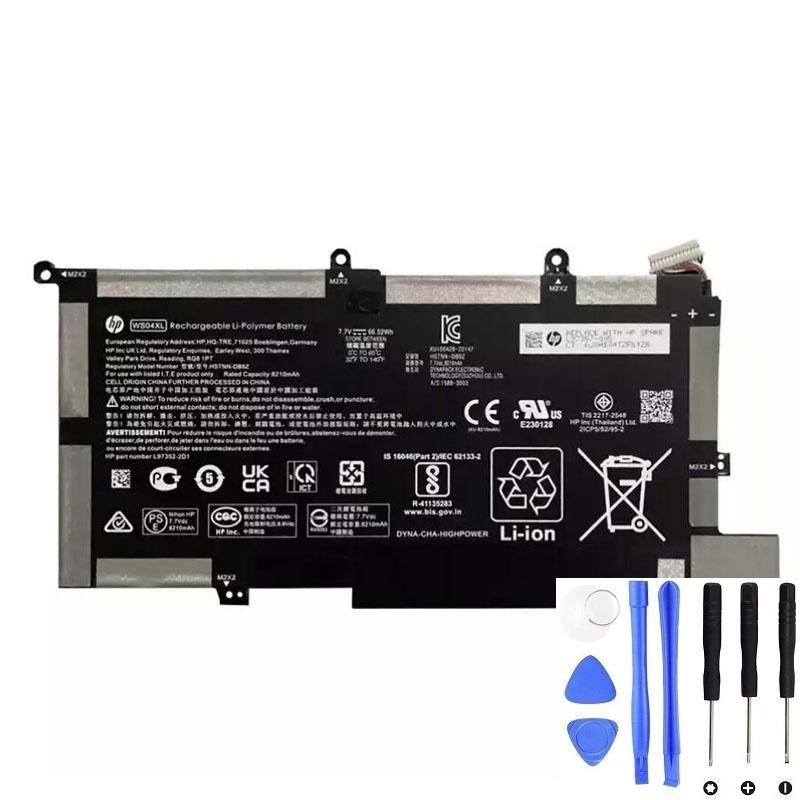
Model: HP WS04XL Replacement Battery
- Capacity: 66.52 Wh (approx.)
- Voltage: 7.7 V (typical for this model)
- Chemistry: Li-ion (4-cell), includes cable
- Spare Part Number: L97357-005
- Compatibility: HP Spectre x360 14t-ea000 CTO and related WS04XL platforms
Preparation
- Back up important data and shut down Windows properly.
- Disconnect AC adapter and all peripherals.
- Use an anti-static wrist strap if available.
- Tools required: Phillips screwdriver, Torx T5 screwdriver, plastic pry tool.
Step 1 – Remove Bottom Cover
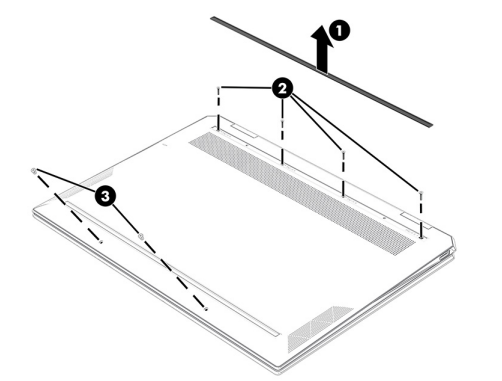
- Close the computer and place it upside down with the front facing you.
- Remove the rear rubber foot strip. Spare part numbers:
M22169-001 (Natural Silver), M22168-001 (Nightfall Black), M22170-001 (Poseidon Blue). - Remove the following screws:
- Four Phillips M2.0 x 6.9 screws
- Two Torx T5 M2.0 x 3.9 screws
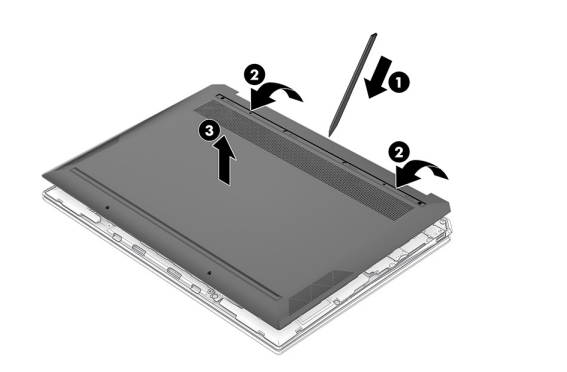
- Use a thin plastic tool to gently separate the rear edge of the bottom cover from the top cover.
- Lift off and remove the bottom cover.
Step 2 – Remove the WS04XL Battery
Battery description: 4-cell, 66 Wh Li-ion battery (includes cable). Spare part number: L97357-005.
Safety warnings:
- Do not puncture, twist, crush, or compress the battery.
- Avoid short circuits. Keep metal tools, screws, and coins away from connectors.
- Use only the user-replaceable or compatible HP replacement battery.
- Save your work and shut down Windows before removing the battery to prevent data loss.
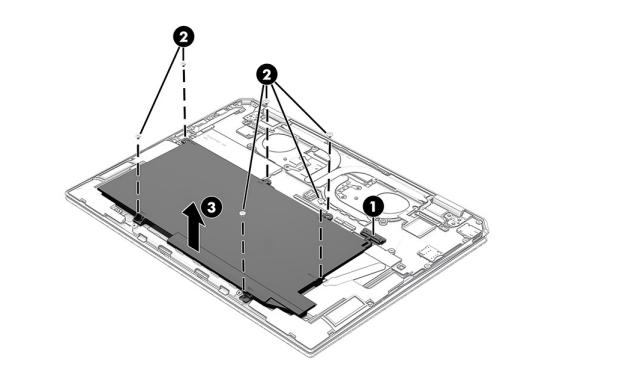
- Disconnect the battery cable from the system board.
- Remove the six Phillips M2.0 x 2.0 screws that secure the battery to the top cover.
- Lift the battery out of the chassis.
Step 3 – Install the New Battery
- Place the new WS04XL battery into position.
- Secure the battery with the six Phillips screws.
- Reconnect the battery cable to the system board.
Final Steps & Safety Notes
- Reinstall the bottom cover by reversing the removal steps.
- Reattach the rear rubber foot strip.
- Power on the laptop and confirm the system detects the new battery.
- Charge to 100% for initial calibration before normal use.