The Acer AC14B8K battery is a widely used 48Wh pack across many Acer laptops
(Aspire, Swift, Nitro, Predator Helios, TravelMate, Chromebook, etc.). You’ll often see it written with the code
4ICP5/57/80. This article explains what that code means, how the battery is built, how to handle it safely,
and how to get longer life from your pack. We’ve also included a direct purchase link and product image for convenience.
Buy the Acer AC14B8K 48Wh Battery
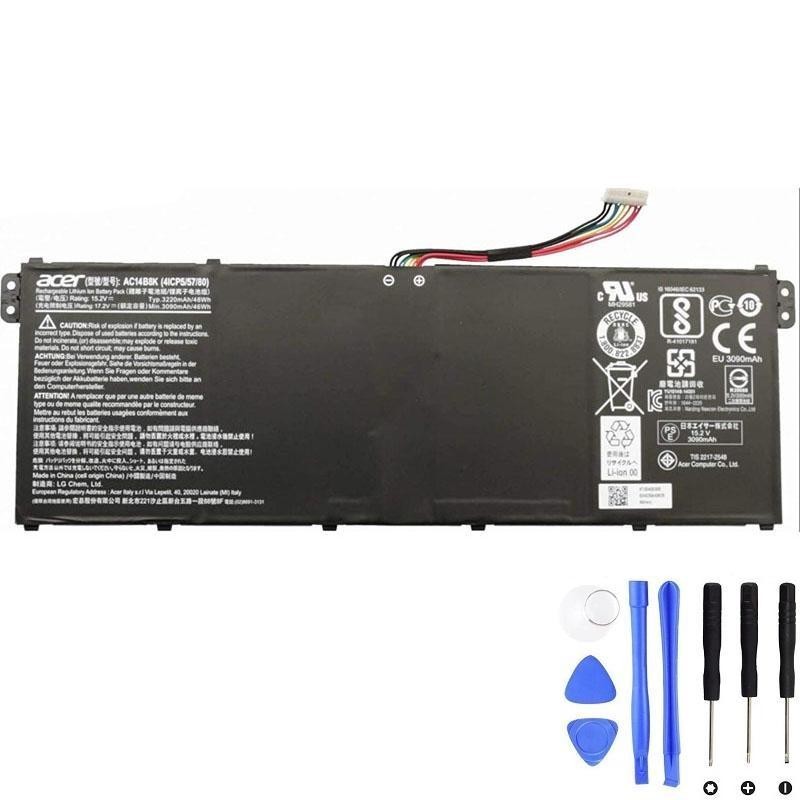
What exactly is “Acer AC14B8K”?
AC14B8K is Acer’s commercial part number for a rechargeable laptop battery module.
It typically delivers 48Wh at a nominal voltage of 15.2V using a 4-cell (4S) lithium pack.
Some models also accept the sibling code AC14B3K—always match voltage, connector, and shape before purchasing.
Check Price & Availability — AC14B8K
What does “4ICP5/57/80” mean?
It’s an industry-style structural designation (aligned with IEC naming conventions) that describes the internal build:
- 4 — four cells in series (4S), giving a nominal ~15.2V (~3.8V per cell).
- ICP — lithium-ion polymer pouch cells (rechargeable).
- 5/57/80 — approximate cell dimensions in millimeters (thickness/width/length),
i.e., about 5 mm × 57 mm × 80 mm.
So, 4ICP5/57/80 is an engineering/identification code—not a retail model number. It helps verify form factor and safety documentation.
Key Specifications
| Specification | Details |
|---|---|
| Battery Type | Li-ion / Lithium-Polymer (pouch) |
| Capacity | 48 Wh (≈ 3220 mAh at pack level) |
| Voltage | 15.2 V nominal (4S) |
| Number of Cells | 4-cell (series) |
| Condition | Brand New |
| Typical Cycle Life | ~300–500 full cycles (usage dependent) |
| Approx. Weight | ≈ 0.69 lb (≈ 310 g) |
| Common Compatible P/Ns | AC14B8K, AC14B3K, 4ICP5/57/80, KT.0040G.004, KT.0030G.004, KT.0040G.011, KT0040G002, KT0040G011 |
How to maximize AC14B8K lifespan
- Avoid daily 0–100% cycles. Shallow cycles (e.g., 20–80%) are gentler on lithium chemistry.
- Keep temperatures in check. Don’t block vents; clean dust; avoid gaming/rendering on soft surfaces that trap heat.
- Use charge caps if available. Some BIOS/OEM tools let you cap charging (e.g., 80%) when plugged in for long sessions.
- Occasional calibration. Every few months: charge to 100%, rest on AC 30–60 min, use down to ~10–15%, then recharge to 100% uninterrupted.
- Stay updated. Keep BIOS/EC and power-management drivers current for accurate fuel-gauge readings.
Quick health check on Windows
- Open an elevated Terminal (Win+X → Windows Terminal (Admin)) and run:
powercfg /batteryreport /output %USERPROFILE%\Desktop\battery-report.html - Open the report and compare Design Capacity vs Full Charge Capacity.
If full capacity ≤ ~70% of design or cycle count is high, a replacement will noticeably improve runtime.
Replacement overview (high level)
- Power down & unplug. Hold the power button ~10s to discharge residual rails.
- Remove the bottom cover. Phillips/Torx screws; some are hidden under rubber feet. Use plastic picks to release clips.
- Disconnect the battery cable. Slide the connector straight out—never pull on the wires.
- Unscrew & lift the old pack. Note cable routing and any light adhesive pads.
- Install the new AC14B8K. Lay it flat, refit screws snugly, reconnect the cable fully.
- Reassemble & test. Boot on AC; Windows may take a few cycles to stabilize capacity readings.
Order the Acer AC14B8K 48Wh Battery (4ICP5/57/80)
FAQs
Is AC14B8K the same as AC14B3K?
They’re sibling part numbers with overlapping compatibility. Always match voltage, connector, and form factor for your exact laptop model.
Does staying plugged in damage the battery?
Heat is the bigger enemy. If your laptop runs cool and you enable a charge cap (when available), long-term plug-in use is generally fine.
How many hours will 48Wh provide?
It depends on workload. Light office use at ~8–10W draw yields roughly 4.5–6 hours; heavier tasks reduce runtime significantly.
Responsible end-of-life: recycle
Never dispose of lithium batteries in household trash. Use an e-waste/recycling program. If the pack is removed, cover the terminals and transport in a non-conductive bag/box.
Summary: The Acer AC14B8K is a 48Wh, 4-cell lithium-polymer battery whose internal construction is denoted by 4ICP5/57/80. Understanding this code helps you verify the right form factor and voltage; good charging habits and thermal management will keep your battery healthier for longer.