If your Acer laptop drains quickly, shuts off unexpectedly, or reports “Plugged in, not charging,” your internal battery may be at end-of-life. This guide covers how to diagnose battery issues, choose the correct replacement (Acer AC14B8K 48Wh, compatible with AC14B3K and others), replace it safely, and calibrate it for best longevity.
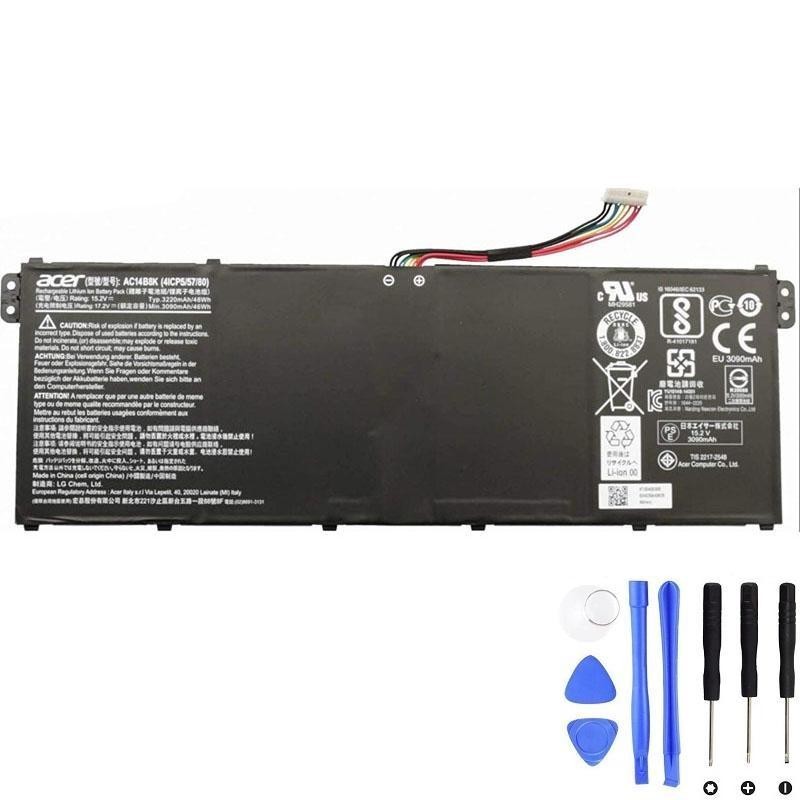
Common Battery Symptoms
- Fast drain or sudden shutdown at a certain percentage.
- Charge stuck at 80–90% or “Plugged in, not charging.”
- Battery swelling that lifts the touchpad or bottom cover (stop using immediately).
Quick Diagnosis (Windows & BIOS)
- Windows Battery Report: Open an elevated Terminal (Win+X → Windows Terminal Admin) and run:
powercfg /batteryreport /output %USERPROFILE%\Desktop\battery-report.html
Compare Design Capacity vs Full Charge Capacity. If full ≤ ~70% of design or cycle count is high, replacement is due. - Charger & Port Check: Test with your original Acer-rated charger and try another port/cable if available.
- BIOS/UEFI & Acer Care Center: Run diagnostics and install any firmware/EC updates.
Choose the Right Replacement (AC14B8K 48Wh)
- Main model: Acer AC14B8K (48Wh) — compatible with multiple Acer series.
- Also known as: AC14B3K and related FRU/part codes (see full list below).
- Buy with confidence:
Acer AC14B8K 48Wh Battery
.
Tools, Prep & Safety
- Phillips PH0/PH00 and/or Torx T5 (varies by model family).
- Plastic opening picks/spudger, tweezers.
- Isopropyl alcohol (≥90%) + lint-free cloth (adhesive cleanup).
- ESD precautions: power off, unplug, ground yourself. If the pack is swollen, do not puncture or bend.
Step-by-Step Replacement (Acer chassis)
- Shut down & discharge: Power off; hold the power button ~10s to clear residual power. Unplug accessories.
- Remove bottom cover: Remove visible screws (some models hide screws under feet). Use a plastic pick to release clips—avoid metal prying.
- Disconnect the battery: Slide the pack’s board connector straight out; never tug on the wires.
- Unscrew and lift the old pack: Remove battery screws; lift slowly (light adhesive pads may be present). Note cable routing.
- Install the new AC14B8K: Set the new pack flat without flexing; reinstall screws snugly; reconnect the cable fully.
- Reassemble: Check for trapped cables; snap the cover back; reinstall screws; re-stick rubber feet if removed.
- First boot: Connect the Acer charger and power on; Windows may recalibrate readings during initial cycles.
Calibrate & Optimize the New Battery
- Charge to 100% while idle; keep on AC another 30–60 minutes.
- Use down to ~10–15% (avoid frequent 0% drains), then recharge to 100% uninterrupted.
- Update BIOS/EC via Acer Care Center or Acer Support; rerun Windows Battery Report to confirm capacity stabilizes.
Post-Replacement Troubleshooting
- “Plugged in, not charging”: Reseat the battery connector; test a known-good charger/port.
- Percentage jumps/drift: Perform a fresh calibration cycle; apply BIOS/EC updates.
- Shuts off under load: Inspect thermals/fans for dust; ensure all battery screws (ground points) are installed.
- Swelling or odor: Power down immediately; contact the seller for RMA; dispose via e-waste center.
Recycle & Disposal
Never trash lithium-ion packs. Use e-waste/recycling programs. Cover terminals and transport in a non-conductive bag/box.
Technical Specifications
| Specification | Details |
|---|---|
| Battery Type | Li-ion / Lithium-Polymer |
| Capacity | 48 Wh / 3220 mAh |
| Voltage | 15.2 V |
| Number of Cells | 4-cell |
| Condition | Brand New |
| Battery Life | Approx. 300–500 recharge cycles |
| Weight | Approx. 0.69 lb (≈ 310 g) |
| Compatible Part Numbers (summary) | AC14B8K, AC14B3K, 4ICP5/57/80, KT.0040G.004, KT.0030G.004, KT.0040G.011, KT0040G002, KT0040G011 |
Compatible Laptop Models (Full)
This Acer AC14B8K battery is compatible with the following laptops (full list, no omissions):
- Acer Aspire Series: Z3-700; Aspire 5 (A514-52 / A514-52G / A514-52K / A514-52KG / A515-41G / A515-43 / A515-43G / A515-45G / A515-51 / A515-51G / A515-52 / A515-52G / A515-52K / A515-54 / A515-54G / A517-51G / A517-51GP / A517-51P); Aspire 6 (A615-51); Aspire 7 (A715-71 / A715-71G / A715-72G / A715-73G / A717-71G / A717-72G)
- Aspire E Series: E3-111; E5-475 / E5-475G / E5-575T / E5-575TG / E5-721 / E5-731 / E5-731G / E5-771 / E5-771G
- Aspire ES Series: ES1-311 / ES1-433 / ES1-511 / ES1-512 / ES1-572 / ES1-711 (and ES1-711 sub-models C0E5, C2KF, C5QT, C7CS, C7F8, C7YU, C81L, C85D, C94B, C9YP, G-C33U, G-C85N, G-P12Y, G-P1E1, G-P3RU, G-P3VV, G-P4GT, G-P4N7, G-P5ZS, G-P664, G-P6V7, G-P8J6, G-P8LA, P0K9, P39F, P3D0, P3NE, P4C6, P54A, P6K8, P7HS, P7JE, P838, P8P2, P90E, P94L)
- Aspire R Series: R11 (R3-131T); R13 (R5-371T / R7-371T / R7-372T); R14 (R5-431T / R5-471T); R15 (R5-571T / R5-571TG)
- Aspire V Series: V3-111P / V3-112P / V3-331 / V3-371 / V3-372 / V3-372T
- Chromebook Series: C810 (C810, T7ZT, T9CA, T9ZP); C910 (C910, 354Y, C4QT); CB5-311 (CB5-311, T0B2, T0Z8, T1UU, T2T6, T4L3, T6HK, T6JJ, T6R7, T7H5, T7LG, T7NN, T7SH, T9B0, T9Y2); CB5-571 (CB5-571, 39VM, C09S, C6W0, C9GR, COLE)
- Extensa Series: Extensa 2540
- Nitro 5: AN515-31 / AN515-41 / AN515-42 / AN515-51 / AN515-52 / AN515-53
- Predator Helios 300: G3-571 / G3-572 / PH315-51 / PH317-51 / PH317-52
- Spin Series: Spin 1 (SP111-31 / SP113-31); Spin 3 (SP315-51); Spin 5 (SP513-51 / SP515-51GN / SP515-51N)
- Swift Series: Swift 3 (S40-10, SF313-51, SF314-41 / 41G / 51 / 52 / 52G / 53G / 54 / 54G / 55 / 55G / 56 / 56G, SF315-41 / 41G / 51 / 51G)
- TravelMate Series: B115-M / B115-MP / B116-M / B116-MP / B117-M / B118-G2-R / B118-G2-RN / B118-M / B118-R; P236-M / P238-G2-M / P238-M / P2410-G2-M / P2410-G2-MG / P2410-M / P2510-G2-M / P2510-G2-MG / P2510-M / P259-M / P276-M / P276-MG / P449-G2-M / P449-G2-MG / P449-G3-MG / P449-M / P449-M-54MU / P449-M-74TW / P449-MG / P449-MG-56T6 / P459-G2-M / P459-G2-MG / P459-M / P459-M-59C3 / P459-M-74CD / P459-MG / P459-MG-5026; Spin B1 B118-RN; X349-G2-M / X349-M
- Packard Bell: EasyNote TF71BM, EasyNote TG71BM
Compatible Part Numbers (Full)
- AC14B8K (Main Model)
- AC14B3K
- 4ICP5/57/80
- KT.00403.026
- KT.00403.027
- KT.00405.005
- KT.0040G.002
- KT.0040G.004
- KT.0040G.005
- KT.0040G.006
- KT.0040G.011
- KT0040G002
- KT0040G011