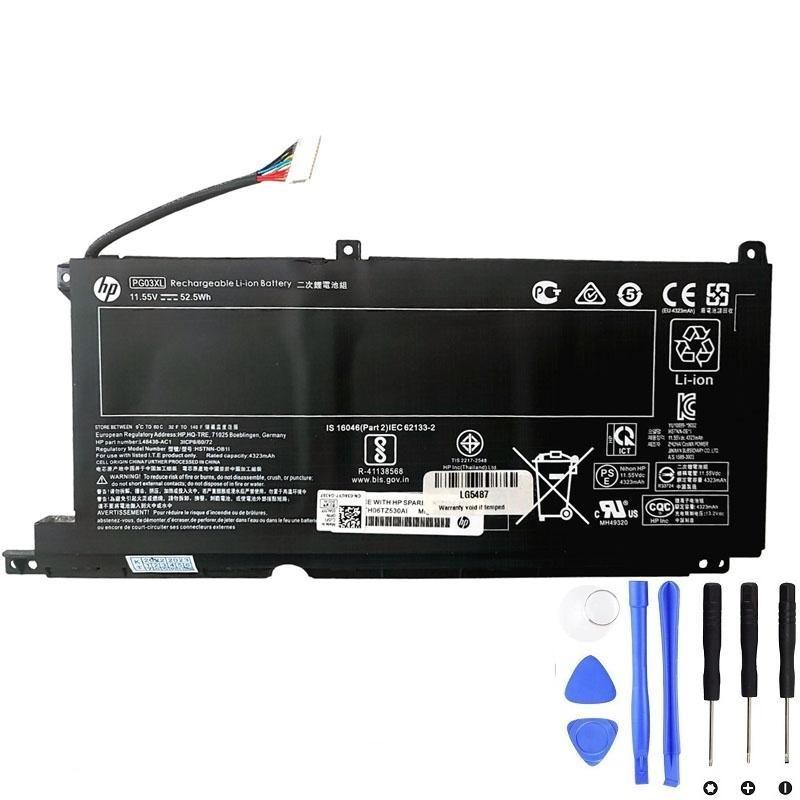
Compatible model: HP Pavilion 15-dk0068wm
Need the correct part? Get the HP PG03XL 52.5Wh battery before you begin.
Summary
- Common symptoms that mean your laptop battery needs replacement
- How to verify battery health before you buy
- Tools, parts, and screw map
- Preparation and safety
- Step 1 — Remove the bottom cover
- Step 2 — Disconnect the battery cable
- Step 3 — Remove the battery
- Step 4 — Install the new PG03XL battery
- Step 5 — Reassemble and test
- Battery calibration and optimization
- Quick Q&A
Common symptoms that signal it is time to replace the battery
| Symptom | What it usually means | What you can check |
|---|---|---|
| Battery drains very fast or jumps from 40% to 10% | High wear, aged cells, or cell imbalance | Run a battery report; compare design vs. full charge capacity |
| Unexpected shutdowns when unplugged | Voltage sag under load; bad cell group | Boot on AC only; then unplug to reproduce |
| Battery stuck at a certain % or “Not charging” | Battery protection threshold, worn pack, or DC jack/adapter issue | Try another charger; inspect the DC port; check Windows battery settings |
| “Battery not detected” or BIOS/HP Diagnostics error | Controller fault or end-of-life pack | Run HP Hardware Diagnostics; check in BIOS |
| Trackpad clicks feel tight or case seam lifts | Battery swelling (urgent safety issue) | Stop using; do not puncture; replace the pack promptly |
| Laptop throttles hard on battery but fine on AC | Battery cannot supply required current | Run a stress test on battery vs. AC |
How to verify battery health before you buy
- On Windows, press Win + X → Terminal (Admin), then run:
powercfg /batteryreport. Open the generated HTML and compare Design capacity vs. Full charge capacity. - Open HP Hardware Diagnostics (BIOS or Windows app) and run the battery test for a pass/fail result and status codes.
- Cross-check your charger and DC jack. Try a known-good adapter with the correct wattage; inspect the port for wobble or debris.
- If the pack is swollen, skip all testing and replace the battery immediately.
Tools, parts, and screw map
Tools & parts
- Phillips precision screwdriver
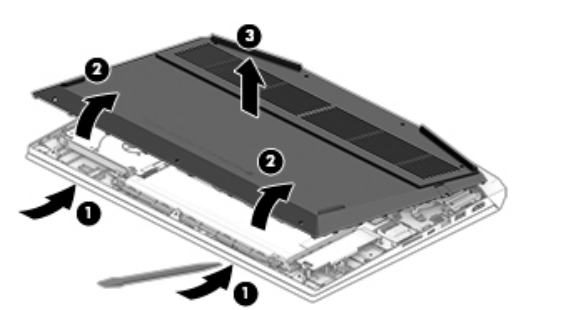
- Plastic spudger / guitar pick
- ESD strap or frequent grounding
- Small tray for screws
- HP PG03XL 52.5Wh replacement battery
Screw map
| Location | Type | Qty |
|---|---|---|
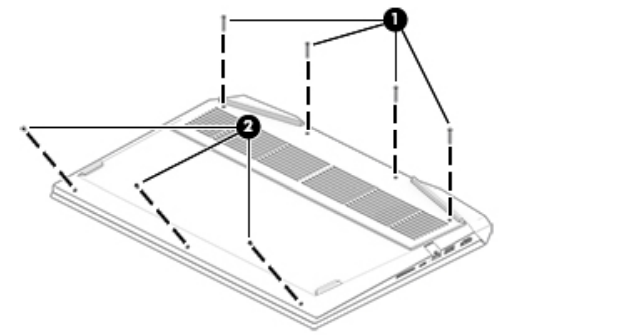
| Bottom cover (long) | Phillips M2.0 × 14.6 | 4 |
| Bottom cover (short) | Phillips M2.0 × 3.0 | 3 |
| Battery to top cover | Phillips M2.0 × 4.5 | 4 |
Preparation and safety
- Shut down the laptop completely.
- Disconnect the AC adapter from the wall and from the laptop.
- Unplug all external devices.
- Work on a clean, static-safe surface.
Step 1 — Remove the bottom cover
- Turn the laptop upside down with the front edge facing you.
- Remove the four Phillips M2.0 × 14.6 screws.
- Remove the three Phillips M2.0 × 3.0 screws.
- Gently release the clips with a plastic pick and lift off the bottom cover.
Step 2 — Disconnect the battery cable
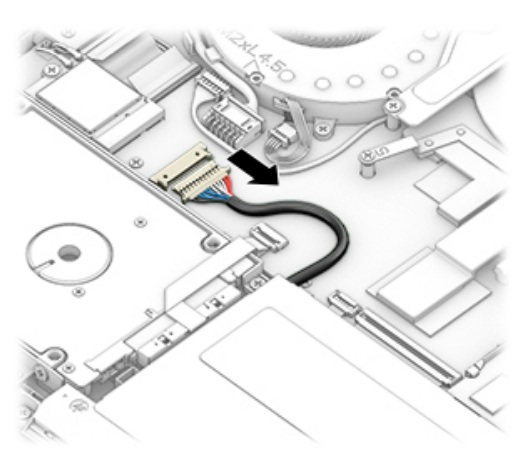
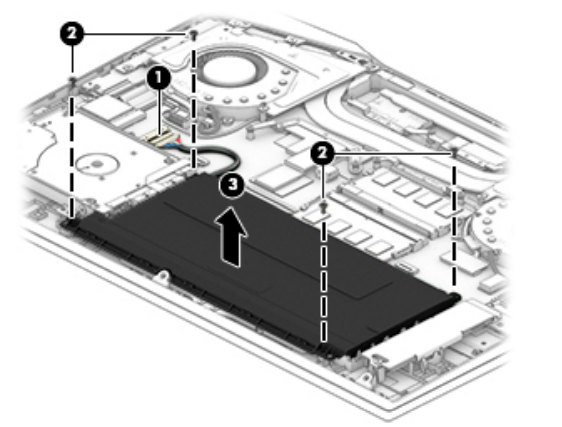
- Locate the battery connector on the system board.
- Using a spudger, slide the battery cable straight out of the socket.
Step 3 — Remove the battery
- Remove the four Phillips M2.0 × 4.5 screws securing the battery.
- Lift the battery straight up and out of the chassis.
Step 4 — Install the new PG03XL battery
- Place the new HP PG03XL 52.5Wh battery into position.
- Reinstall the four Phillips M2.0 × 4.5 screws.
- Reconnect the battery cable, ensuring it is fully seated and parallel to the board.
Step 5 — Reassemble and test
- Align the bottom cover, press around the edges to engage the clips, and reinstall seven screws in their original locations.
- Reconnect AC power and boot into BIOS to confirm the battery is detected.
- Start Windows and confirm that the system charges and reports a normal percentage.
Battery calibration and optimization
- Charge to 100% and keep charging for 30–60 minutes.
- Use the laptop on battery until 10–20%, then charge back to 100% without interruption.
- Install Windows and HP updates. Avoid frequent 0–100% cycles; keep typical daily use between ~20–80% when practical.
- For storage longer than two weeks, leave the battery around 50–60% and power off.
Optional while you are inside — memory service
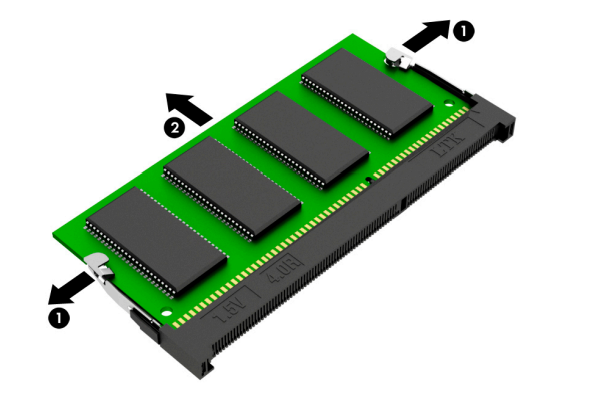
- Spread the retaining tabs to release the memory module; pull it out at an angle.
Quick Q&A
Will this battery fit my HP Pavilion 15-dk0068wm? Yes, the PG03XL 52.5Wh pack is the correct family for this model.
Do I need any soldering? No, the battery is a plug-in assembly secured by screws.
How long does the swap take? Typically 20–40 minutes if you have the tools ready.
What if the laptop still does not charge? Re-seat the battery connector, try another charger, and check the DC jack. If the issue persists, run HP Diagnostics.