If your Dell laptop uses a WDX0R (42Wh) battery and you’re seeing short runtime, charging problems, or random shutdowns, the battery may be reaching end-of-life. Laptop batteries are consumable parts—once they wear down, your laptop can feel unreliable even when everything else is fine.
This guide shows you the most reliable ways to confirm whether your Dell WDX0R (42Wh) battery needs replacing, using symptoms plus quick checks in Windows and Dell diagnostics.
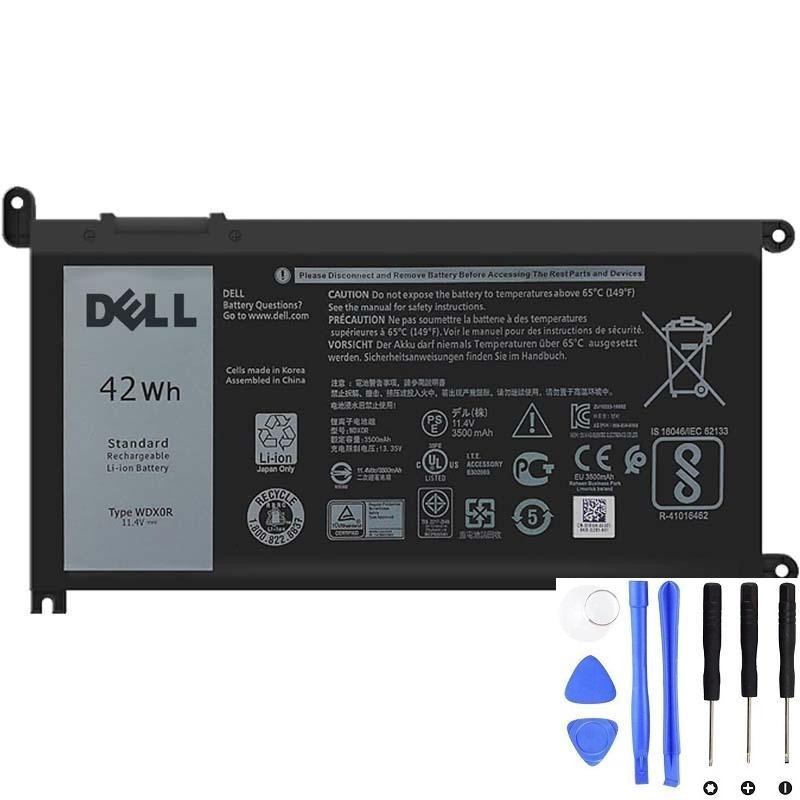
Need a replacement Dell WDX0R battery?
Check the product page for specs and fit.
1) Quick checklist: strongest signs your WDX0R battery is failing
If you have two or more of these, replacement is usually the best fix:
- Runtime dropped sharply (hours → under 30–60 minutes)
- Battery % jumps (e.g., 45% → 15% suddenly) or % is clearly inaccurate
- Random shutdowns even when battery shows charge remaining
- Only works on AC power (unplugging shuts it off)
- Charging problems (“plugged in, not charging”, charging stuck at a certain %)
- Battery health warning in Windows/Dell utilities
- Swelling (bulging bottom cover, touchpad lifting, chassis gaps)
Safety: if you suspect swelling, stop using the laptop on battery power and avoid pressing on the case. A swollen battery should be replaced as soon as possible.
2) The best proof: generate a Windows battery report
A battery can still charge to “100%” but hold far less energy than when new. The Windows battery report shows your battery’s real usable capacity today.
How to generate it
- Right-click Start → Terminal (Admin) or Command Prompt (Admin)
- Run this command:
powercfg /batteryreportOpen the report and compare:
- DESIGN CAPACITY (what it was when new)
- FULL CHARGE CAPACITY (what it can hold now)
- CYCLE COUNT (if shown)
How to interpret it (practical)
- Healthy: full charge capacity is close to design capacity (some drop is normal)
- Worn but usable: around 70–85% of design capacity
- Replace recommended: often below roughly 60–70%, or if you have shutdowns/% jumps even when capacity looks “OK”
3) Confirm with Dell diagnostics (pre-boot test)
Dell laptops commonly include built-in pre-boot diagnostics (often called ePSA). This is useful because it tests power/battery without Windows running.
- Restart the laptop
- Tap F12 at boot to open the one-time boot menu
- Select Diagnostics
- Run the test and note any battery-related results
If diagnostics reports battery end-of-life or repeated battery errors, replacement is usually the correct solution.
4) “Is it the battery or the charger?” (avoid replacing the wrong part)
Before buying a new battery, run these quick checks:
- Try a known-good compatible charger (if you have one). A weak/incorrect adapter can cause charging refusal or very slow charging.
- Check the charging port: if charging starts/stops when the plug moves, the port or adapter plug may be worn.
- AC vs battery test:
- Stable on AC but unstable on battery → battery is the top suspect
- Unstable on both AC and battery → look at charger/port, overheating, or system stability
5) Why “good percentage” can still shut down (simple explanation)
The battery percentage is an estimate. As batteries age, they can develop higher internal resistance. Under load (opening apps, video calls, multitasking), voltage can drop too low too fast, and the laptop shuts down to protect itself—even if it still shows 20–40%.
6) When replacement is the best option (real-world guidance)
Most users replace the WDX0R battery when one of these is true:
- They need reliable portable use again (work, travel, school)
- Battery report shows a large capacity drop and runtime is no longer acceptable
- There are stability problems (shutdowns, percentage jumps, charging errors)
- There are safety signs (swelling, abnormal heat, odor)
7) FAQ
- My battery report doesn’t look terrible, but the laptop still shuts down—why?
Capacity can look “OK” while the battery can’t deliver stable power during spikes. Shutdowns and % jumps are strong failure signs. - Should I calibrate the battery?
Calibration can improve percentage accuracy, but it won’t restore lost capacity. If you have shutdowns, swelling, or repeated warnings, replacement is the better choice. - How do I make sure I’m buying the right battery?
Match the part number (WDX0R) and confirm the connector/shape match your original battery.
Ready to replace your Dell WDX0R (42Wh) battery?
If you’re seeing fast drain, random shutdowns, inaccurate battery percentage, or failed diagnostics, replacing the battery is usually the fastest and most reliable fix.