From a traditional point of view, a “removable battery” means a pack that can be released by sliding latches on the bottom of the notebook and swapped in seconds without tools.
Modern HP Envy x360 convertibles no longer use this design. Instead, they are equipped with an internal serviceable battery that can be replaced by removing the bottom cover and disconnecting a cable, but not simply “popped out” by the end user.
In other words: most HP Envy x360 models do not have a classic, tool-less removable battery, but the battery is replaceable using standard service procedures.
1. Removable vs. Serviceable: Understanding the Terminology
When discussing battery design in the HP Envy x360 family, it is important to distinguish:
-
Removable (hot-swappable) battery
The battery is externally accessible, locked by latches, and can be removed without opening the chassis or using tools. -
Internal serviceable battery
The battery is located inside the chassis. It is attached with screws and connected by a cable to the motherboard.
Replacement requires removal of the bottom cover and typically a Phillips screwdriver and plastic pry tool.
All current Envy x360 13/15/17 convertible platforms are designed with an internal serviceable battery.
This approach supports slimmer designs but means end users cannot quickly swap batteries in the field.
2. How the HP Envy x360 Battery Is Built
Most Envy x360 15" and 17" models use a flat, multi-cell lithium-ion pack positioned under the palm rest area.
The battery is secured with several screws and connected to the system board via a low-profile cable.
Typical characteristics for Envy x360 batteries in the 15" and 17" class include:
- Battery type: internal lithium-ion pack (3–4 cells depending on model).
- Nominal voltage: approximately 11.4–11.55 V.
- Energy: typically around 50–55 Wh for many 15" and 17" configurations.
- Service access: via removal of the bottom cover; no external latch or bay.
For a large group of HP Envy x360 15" / 17" and HP Pavilion x360 15-cr models, HP uses the
LK03XL battery platform, often associated with HP spare part numbers such as
L09280-855 or L09281-855.
These packs are internal, screw-mounted batteries rather than classic removable units.
3. How to Check Which Battery Your Envy x360 Uses
Because HP has released multiple generations of Envy x360 systems, the exact battery model can vary.
To determine which battery your device uses and whether it belongs to the LK03XL family, follow these steps:
-
Identify your exact product number
In Windows, open HP Support Assistant or press Fn + Esc on many HP notebooks to display the product name and product number (for example, Envy x360 15-bpXXX, 15-bqXXX, 15-cn0XXX, 15-cr0XXX, 17-aeXXX, etc.). -
Consult the maintenance and service guide
HP publishes a Maintenance and Service Guide for most models, listing supported batteries and HP spare part numbers.
Search for “Maintenance and Service Guide” together with your product number. -
Check the label on the existing battery (if already opened)
After safely removing the bottom cover (see section 4), read the battery label.
You may see markings such as:- Model: LK03XL
- Replace with HP spare: L09280-855 / L09281-855 or similar codes such as 916814-855, HSTNN-LB7U, HSTNN-IB8M, etc.
If your battery label includes LK03XL or HP spare references like L09280-855 / L09281-855,
your Envy x360 belongs to the group of devices using this internal platform.
4. High-Level Steps to Replace the Internal Battery
Although the HP Envy x360 does not have a simple clip-out battery, the internal battery is designed to be serviceable by technicians or experienced end users.
The exact procedure differs slightly by generation, but the overall approach is similar:
-
Preparation
- Shut down the notebook fully (do not use Sleep or Hibernate).
- Disconnect the AC adapter and all external devices.
- Press and hold the power button for 10–15 seconds to discharge residual power.
- Work on a clean, static-safe surface; an anti-static wrist strap is recommended.
-
Remove the bottom cover
- Remove the screws from the bottom case (some may be hidden under rubber feet or labels).
- Use a plastic pry tool to carefully release the clips around the perimeter of the cover.
- Lift off the cover to expose the internal components.
-
Disconnect and remove the battery
- Locate the battery – a flat, rectangular pack near the palm rest area.
- Disconnect the battery cable from the system board by pulling on the connector housing, not the wires.
- Remove the screws securing the battery and carefully lift the pack out of the chassis.
-
Install the new battery
- Place the new battery in the same position and orientation as the original.
- Reinstall the screws and reconnect the battery cable, ensuring it is fully seated.
- Reattach the bottom cover, press along the edges to engage the clips and reinstall all screws.
-
Post-installation checks
- Connect the AC adapter and power on the notebook.
- Confirm that Windows reports a battery percentage and “Plugged in, charging”.
- Optionally run HP’s built-in battery diagnostics to verify the status of the new pack.
If you do not have prior experience opening notebooks, consider professional service or follow a model-specific tutorial or service manual step by step.
5. Example: LK03XL / L09280-855 Battery for Envy x360 15" / 17" and Pavilion x360 15-cr
Many 15" and 17" HP Envy x360 systems, as well as the Pavilion x360 15-cr series, use the LK03XL internal battery platform,
commonly associated with HP spare part numbers such as L09280-855 or L09281-855.
For these devices, a high-quality replacement battery with matching specifications provides a straightforward way to restore mobile runtime.
Professional LK03XL Replacement for HP Envy x360 / Pavilion x360 15-cr
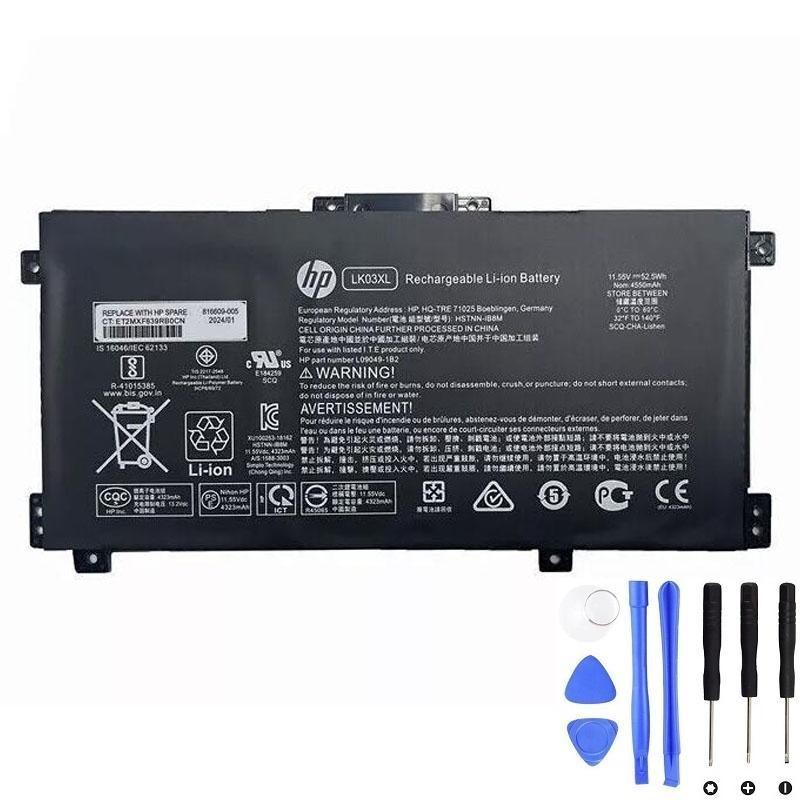
View LK03XL / L09280-855 Compatible Battery
Designed as a compatible replacement for Envy x360 15"/17" and Pavilion x360 15-cr models that use the LK03XL platform and HP spare numbers such as L09280-855 / L09281-855.
Always verify compatibility with your exact model and HP spare number before ordering.
6. After the Replacement: Calibration and Best Practices
Once the new internal battery is installed, a few additional steps help ensure stable performance and accurate charge reporting:
- Initial full charge – Charge the battery to 100% before heavy use.
- Optional calibration cycle – Use the notebook on battery until the charge drops to around 10–20%, then recharge to 100% without interruptions. Repeat once or twice if necessary.
- Avoid frequent deep discharges – For daily use, try to recharge before the battery reaches 0%.
- Maintain proper cooling – Prevent blocked vents and avoid prolonged use on soft surfaces that trap heat.
- Store partially charged – If the notebook will be unused for several weeks, store it turned off at approximately 40–60% charge in a cool, dry environment.
7. Summary: Removable vs. Replaceable on HP Envy x360
To directly answer the question: the HP Envy x360 does not have a classic, externally removable battery with manual latches.
Instead, it uses an internal, screw-mounted battery such as the LK03XL, which is replaceable through standard service procedures.
By identifying your exact Envy x360 model, checking the existing battery’s spare number (for example, L09280-855 / L09281-855),
and selecting a compatible high-quality replacement, you can restore original battery life and keep your convertible running reliably for years to come.