HP HT03XL / L11119-855 Battery — Definitive Compatibility, Diagnosis & Replacement Guide (Pavilion 14 / 15 / 17 & More)
If your Pavilion or 14/15/17-inch HP notebook no longer holds charge, this guide shows how to confirm compatibility with the HT03XL (≈41.04Wh) battery, diagnose failures, and safely replace it—step by step.
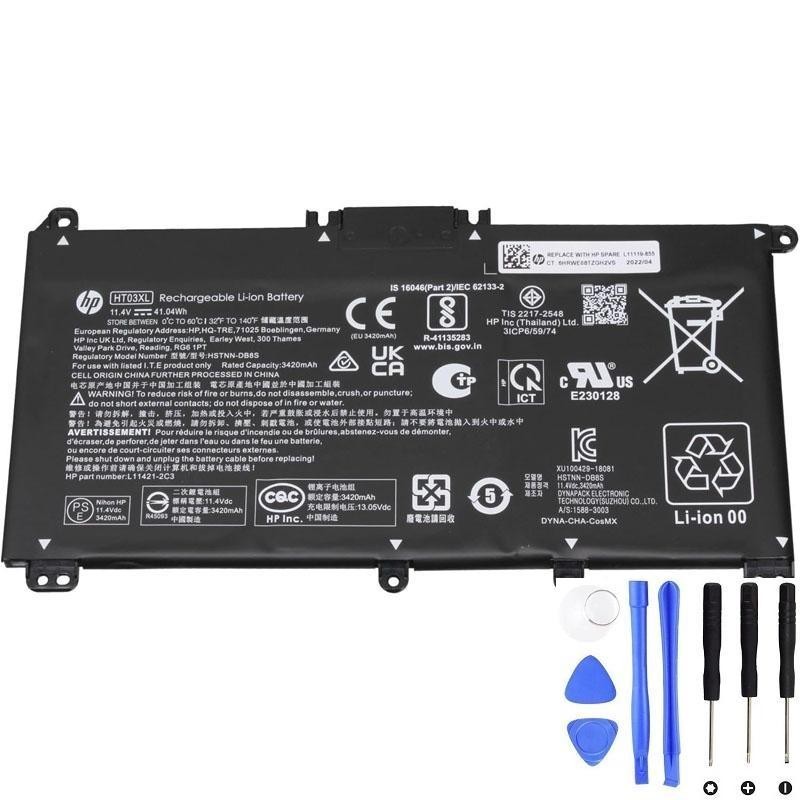
Buy the HP HT03XL (≈41.04Wh) Battery
- Direct fit for many Pavilion 14 / 15 / 17 and x360 variants
- Replaces L11119-855 and the full list of HP part numbers below
- Quality cells, 1-year guarantee, clear compatibility guidance
1) Typical Symptoms When It’s Time to Replace the Battery
- Run-time collapse: Drops from hours to minutes even after a full charge.
- Unexpected shutdowns: Laptop powers off around 20–50% reported level.
- Charging stuck or erratic: Charging LED blinks, level stuck on one number, or “Plugged in, not charging”.
- Battery report warnings: Windows “Battery needs replacement” or HP diagnostics shows Failed.
- Swollen pack indicators: Bottom case bulge, touchpad clicking stiffness—stop using and replace now.
2) Quick Battery Diagnosis Checklist
Tick what you’ve observed. If you select 2 or more, replacement is strongly recommended.
3) Confirm Compatibility in 3 Minutes
- Check your current battery label. Power off, disconnect AC. Open the bottom cover (see steps below) and read the battery model printed on the pack. You should see HT03XL or an HP spare number such as L11119-855 (complete list below).
- Note the notebook family. For example: Pavilion 14-CE / 14-CF / 15-DA / 15-DB / 15-DW / 15-DY / 17-BY / 17-CA etc. The exact sub-SKU (e.g., 15-DY2074NR) is listed in our full compatibility table.
- Cross-check below. Your battery’s spare number should appear in Replacement Part Numbers, and your laptop model in Full Compatible Models. If both match, this HT03XL is the right replacement.
Tip: In Windows, press Win+R → type msinfo32 to read the exact “System Model”.
4) Key Specifications
| Battery Model | HT03XL |
|---|---|
| Nominal Wh | ≈ 41.04Wh (3-cell Li-ion) |
| Typical Voltage | ≈ 11.55V (label-printed value may vary slightly by batch) |
| Form Factor | Internal pack with cable/connector (screw-in) |
| Safety | Over-current, over-voltage, short-circuit protections |
Replacement Part Numbers (Complete)
Direct replacements for any of the following HP part/spare numbers:
- HT03XL
- HT03041XL
- HSTNN-UB7J
- HSTNN-DB8R
- HSTNN-LB8L
- HSTNN-IB80
- HSTNN-IB8X
- HSTNN-DB8S
- HSTNN-LB8M
- HSTNN-IB8O
- L11119-855
- L11421-542
- L11421-1C3
- L11421-1C1
- L11421-1C2
- L11421-2C1
- L11421-2C2
- L11421-2C3
- L11421-2D1
- L11421-2D2
- L11421-421
- L11421-422
- L11421-423
- L11421-544
- L11421-545
- TPN-C136
- TPN-I130
- TPN-I131
- TPN-I132
- TPN-I133
- TPN-I134
- TPN-Q207
- TPN-Q208
- TPN-Q209
- TPN-Q210
5) Full Compatible HP Laptop Models (As Provided)
Important: The HT03XL is used across many Pavilion lines. Below is the non-omitted list exactly reflecting the model references you provided, grouped for readability.
HP Pavilion 14 Series
14-CE0000 Series
- 14-CE3065ST, 14-CE1058WM, 14-CE0068ST, 14-CE2068ST, 14-CE1056WM, 14-CE0064ST, 14-CE0006DX
14-CF0000 / 14s-CF0000 Series
- 14-CF0006DX, 14-CF0013DX, 14-CF1015CL, 14-CF0012DX, 14-CF1051OD, 14-CF2074LA, 14-CF2051LA, 14-CF0023CL, 14-CF0018WM, 14-CF0014DX, 14s-CF3074TU, 14s-CF0043TX
- Additional references: 14-cf0013dx, 14-cf0051od
14-CK0000 Series
- 14-CK0013LA, 14-CK2098LA, 14-CK2091LA, 14-CK0001LA, 14-CK0061ST
14-CM0000 Series
- 14-CM0020NR, 14-CM0012NR, 14-CM1025LA
14-DF0000 Series
- 14-DF0023CL, 14-DF0018WM
Pavilion x360 14-DH0000 / 14M-DH0000 Series
- 14-DH2011NR, 14-DH2085CL, 14-DH2075CL, 14-DH2034NR, 14-DH2051WM, 14-DH2097NR, 14-DH2671CL, 14-DH1021NR, 14M-DH0001DX, 14-DH1010LA, 14M-DH1003DX
14-DQ0000 Series
- 14-DQ0070NR, 14-DQ2055WM, 14-DQ2013DX, 14-DQ0011DX, 14-DQ1043CL, 14-DQ2045CL, 14-DQ1033CL, 14-DQ0013DX, 14-DQ2033CL, 14-DQ0004DX, 14-DQ2035CL
14-DK0000 / 14s-DK0000 Series
- 14-DK1003DX, 14-DK0002DX, 14-DK1013DX, 14-DK0028WM, 14-DK1022WM, 14-DK0075NR, 14-DK1025WM, 14-DK0736MS, 14-DK1031DX, 14s-DK0002AU
14-FQ0000 Series
- 14-FQ0032MS, 14-FQ0037NR, 14-FQ1021NR, 14-FQ0013DX, 14-FQ0075NR
14Q-CS0000 Series
- 14Q-CS0006TU
Additional 14-Series references (as provided)
- 14-CE3065ST, 14-CE1058WM, 14-CE0068ST, 14-CE2068ST, 14-CE1056WM, 14-CE0064ST, 14-CE0006DX
- 14-CF0006DX, 14-CF0013DX, 14-CF1015CL, 14-CF0012DX, 14-CF1051OD, 14-CF2074LA, 14-CF2051LA, 14-CF0023CL, 14-CF0018WM, 14-CF0014DX, 14s-CF3074TU, 14s-CF0043TX, 14-cf0013dx, 14-cf0051od
- 14-CK0013LA, 14-CK2098LA, 14-CK2091LA, 14-CK0001LA, 14-CK0061ST
- 14-CM0020NR, 14-CM0012NR, 14-CM1025LA
- 14-DF0023CL, 14-DF0018WM
- 14-DH2011NR, 14-DH2085CL, 14-DH2075CL, 14-DH2034NR, 14-DH2051WM, 14-DH2097NR, 14-DH2671CL, 14-DH1021NR, 14M-DH0001DX, 14-DH1010LA, 14M-DH1003DX
- 14-DQ0070NR, 14-DQ2055WM, 14-DQ2013DX, 14-DQ0011DX, 14-DQ1043CL, 14-DQ2045CL, 14-DQ1033CL, 14-DQ0013DX, 14-DQ2033CL, 14-DQ0004DX, 14-DQ2035CL
- 14-DK1003DX, 14-DK0002DX, 14-DK1013DX, 14-DK0028WM, 14-DK1022WM, 14-DK0075NR, 14-DK1025WM, 14-DK0736MS, 14-DK1031DX, 14s-DK0002AU
- 14-FQ0032MS, 14-FQ0037NR, 14-FQ1021NR, 14-FQ0013DX, 14-FQ0075NR
- 14Q-CS0006TU
HP Pavilion 15 Series
15-CS0000 Series
- 15-CS0064ST, 15-CS3019NR, 15-CS3073CL, 15-CS3672CL, 15-CS3153CL, 15-CS2010NR, 15-CS025CL, 15-CS2073CL, 15-CS2079NR, 15-CS1063CL, 15-CS0072WM, 15-CS0051WM, 15-CS1065CL
- Series ranges: 15-cs3xxx, 15-cs2xxx, 15-cs1xxx, 15t-cs300, 15t-cs200, 15t-cs000
- Additional: 15-cs0085cl, 15-cs0073cl, 15-cs3075cl, 15-cs3073c
15-CW0000 Series
- 15-CW1068WM, 15-CW0002LA, 15-CW1063WM, 15-CW1XXX, 15-CW1004LA, 15-CW0008CY, 15-CW1085NR, 15-CW1001LA
15-CU0000 Series
- 15-CU0058NR
15-DA0000 Series
- 15-DA0066CL, 15-DA0002DX, 15-DA0079NR, 15-DA1005DX, 15-DA0032WM, 15-DA0033WM, 15-DA0073MS, 15-DA0012DX, 15-DA0071MS, 15-DA0086OD, 15-DA0014DX, 15-DA0053WM
- Ranges/additional: 15-da0xxx, 15-da0021cy, 15-da0011la
15-DB0000 Series
- 15-DB0015DX, 15-DB0031NR, 15-DB0011DX, 15-DB0066WM, 15-DB0005DX, 15-DB0048NR, 15-DB0049NR, 15-DB0051OD, 15-DB0048CA, 15-DB0083NR, 15-DB0091NR, 15-DB1011CY
- Ranges/additional: 15-db0xxx, 15-db1xxx, 15-db0004dx, 15t-db000
15-DW0000 Series
- 15-DW0081WM, 15-DW0037WM, 15-DW0046NR, 15-DW0083WM, 15-DW1083WM, 15-DW2025CL, 15-DW2065ST, 15-DW0021CL, 15-DW2025OD, 15-DW20250D, 15-DW2638CL, 15-DW3013DX, 15-DW3015CL, 15-DW2057CL, 15-DW1024WM, 15-DW3065ST, 15-DW2048NR, 15-DW3056CL, 15-DW2072CL, 15-DW3031CL, 15-DW3025CL
15-DY0000 Series
- 15-DY2087NR, 15-DY1031WM, 15-DY1036NR, 15-DY1059MS, 15-DY1005LA, 15-DY1024WM, 15-DY1751MS, 15-DY1023DX, 15-DY1731MS, 15-DY1771MS, 15-DY1124NR, 15-DY1755CL, 15-DY1020NR, 15-DY1086NR, 15-DY1095OD, 15-DY1051WM, 15-DY1076NR, 15-DY1078NR, 15-DY1087NR, 15-DY1971CL, 15-DY0013DX, 15-DY2021NR, 15-DY1043DX, 15-DY1091WM, 15-DY2074NR, 15-DY1071WM
15-EF0000 Series & Related 15/15S/15Q References
- 15-ef0022nr, 15-ef1013dx, 15-ef1040nr, 15-ef0025wm, 15-ef0021nr, 15-ef1073od, 15-ef1001ds, 15-ef1072wm, 15-ef0023dx
- 15Q-DS0019TU, 15Q-DY0002AU
- 15S-FQ0000UR, 15S-FQ0020UR, 15S-FQ2535TU, 15S-FQ2008NJ
- (As provided again) 15-CW1068WM, 15-CW0002LA, 15-CW1063WM, 15-CW1XXX, 15-CW1004LA, 15-CW0008CY, 15-CW1085NR, 15-CW1001LA
HP Pavilion 17 Series
17-BY0000 Series
- 17-BY1053DX, 17-BY1033DX, 17-BY0060NR, 17-BY0021DX, 17-BY0053CL, 17-BY0021CY, 17-BY1055CL, 17-BY0089CL, 17-BY1071CL, 17-BY4075CL, 17-BY3056CL, 17-BY3065ST, 17-BY4063CL, 17-BY1955CL, 17-BY4633DX
- Ranges/additional: 17-by1xxx, 17-by1003cy, 17-ca1010ds, 17-by0019ds, 17-by2003ca, 17-by0063cl, 17-by1022cl, 17-by3613dx
17-CA0000 Series
- 17-CA2097NR, 17-CA3035CL, 17-CA2020NR, 17-CA3055CL, 17-CA0064CL, 17-CA1065CL, 17-CA2096NR, 17-CA0009DS, 17-CA0011DS, 17-CA0056NR
HP Pavilion & Business Lines
- Pavilion 240 G7, 245 G7, 250 G7, 255 G7, 340 G5, 348 G5
6) Safe Replacement Steps (Typical Pavilion 14/15/17 with HT03XL)
Tools: Phillips #0/#00 screwdriver, plastic spudger, ESD strap (recommended).
- Shut down Windows completely and unplug the AC adapter. Move to a static-safe surface.
- Remove the bottom cover. Unscrew all visible base screws. Some models hide two screws under rear feet or rubber strips—peel gently. Pry around the edges with a plastic spudger; avoid metal tools.
- Locate the battery pack (flat black module). Disconnect the battery cable from the motherboard by pulling horizontally on the connector housing (not the wires).
- Unscrew the battery (usually 4–6 screws). Lift the pack out carefully.
- Install the new HT03XL. Place it flat, align screw posts, tighten evenly (do not overtighten). Reconnect the battery cable, ensuring it seats fully.
- Re-fit the bottom cover and screws. Reconnect AC and power on.
- Enter BIOS/UEFI if prompted and clear any battery/case intrusion notes. Boot into Windows.
Note: If you notice mechanical resistance during disassembly, re-check for hidden screws (e.g., beneath stickers or feet). Never bend or puncture the old battery.
7) Post-Install: Calibrate & Care
- Charge to 100% and keep charging for 30–60 minutes.
- Use on battery to ~10–15%, then recharge to 100%. Repeat 1–2 cycles to help Windows relearn capacity.
- For longevity: avoid constant 100% + high heat; aim for cool, ventilated use.
8) Quick FAQ
Is 41.04Wh enough for daily use?
For office/browsing, yes. If you need longer unplugged time, reduce screen brightness and close heavy apps; or carry your charger as backup.
My old pack says a different spare number (e.g., L11421-xxx). Is HT03XL still correct?
Yes—if your spare number appears in the Replacement Part Numbers and your notebook model appears in the list, HT03XL is the intended drop-in replacement.
What if I see case bulge or the touchpad feels tight?
Stop using the laptop and replace immediately. Bulging indicates swelling; continued use risks damage.