If your HP laptop uses the HT03XL battery (often listed with part number L11119-855) and you’re noticing shorter runtime, random shutdowns, or charging warnings, you’re not alone. Batteries are consumable parts—once they wear down, the laptop can become unreliable even when everything else is fine.
This guide shows you the most reliable ways to confirm whether your HP HT03XL (L11119-855) battery needs replacing, using real symptoms plus quick checks in Windows and HP diagnostics.
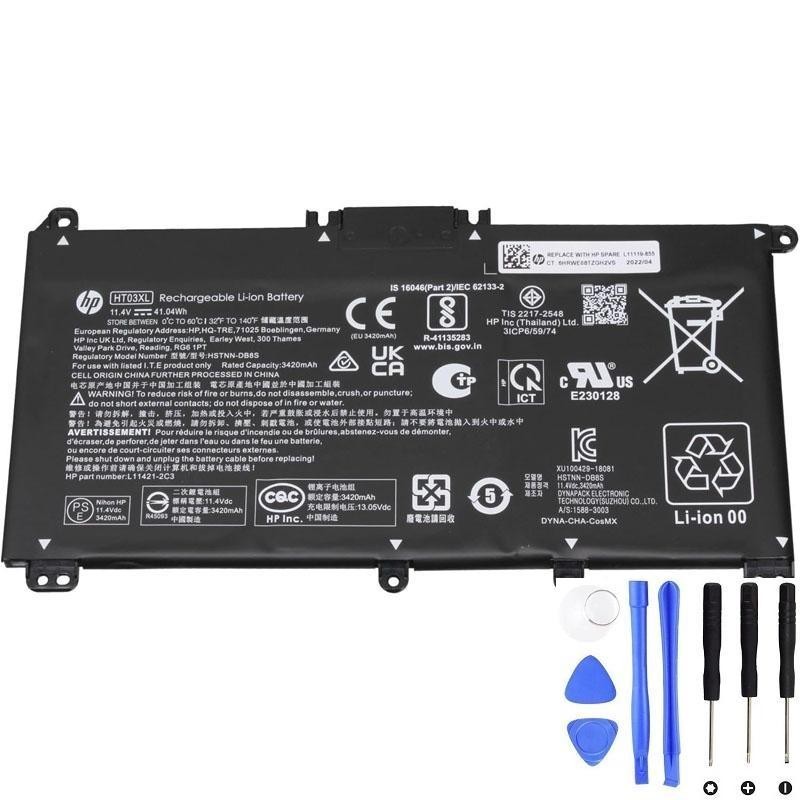
Need a replacement HT03XL battery?
Check the product page for specs and fit.
1) Quick checklist: the strongest signs your HT03XL battery is failing
If you have 2 or more of these symptoms, replacement is usually the best fix:
- Runtime dropped sharply (for example: from hours to under 30–60 minutes)
- Battery % jumps (e.g., 35% → 10% suddenly) or the % is clearly inaccurate
- Random shutdowns even when battery shows charge remaining
- Only works on AC power (unplugging the charger shuts the laptop off)
- Charging problems (stuck at a certain %, “plugged in, not charging”, very slow charging)
- HP/Windows warnings about battery health or replacement
- Battery swelling (bottom cover bulging, touchpad lifting, keyboard/trackpad clicking differently)
Important safety note: If you suspect swelling, stop using the laptop on battery power and avoid pressing on the case. Swollen batteries should be replaced as soon as possible.
2) Confirm with a Windows battery report (best quick proof)
Windows can generate a battery health report that compares your battery’s original design capacity to what it can hold today.
Step-by-step
- Right-click Start → Terminal (Admin) or Command Prompt (Admin)
- Run this command:
powercfg /batteryreportWindows will save a report file (usually in your user folder). Open it and look for these lines:
- DESIGN CAPACITY (what the battery was when new)
- FULL CHARGE CAPACITY (what it can hold now)
- CYCLE COUNT (if shown)
How to interpret it
- Healthy: Full Charge Capacity is close to Design Capacity (minor drop is normal).
- Worn but usable: Around 70–85% of design capacity—shorter runtime, but may still be stable.
- Replace recommended: Often when it drops below roughly 60–70%, or when you have shutdowns/percentage jumps even if capacity looks OK.
Tip: Capacity alone isn’t everything. A battery can show “OK” capacity but still fail under load (leading to sudden shutdowns). That’s why symptoms matter too.
3) Run HP built-in battery diagnostics (another strong confirmation)
HP laptops often include built-in hardware diagnostics that can test the battery.
- Restart the laptop
- Press Esc repeatedly at startup (or F2 on many HP models) to enter HP diagnostics
- Find Battery Test or Component Tests → Power → Battery
If HP diagnostics reports results like “Weak”, “Replace”, or gives repeated failures, that’s a clear sign the HT03XL is at end-of-life.
4) “Is it the battery… or the charger?” (avoid replacing the wrong part)
Before buying a new battery, do these quick checks to make sure the issue isn’t the adapter/charging path:
- Try another compatible charger (if available). A weak adapter can cause slow charging and performance drops.
- Check the charging port for looseness or debris.
- Test without heavy load: if the laptop shuts down only during gaming/rendering, the battery may be unable to provide stable current.
- Battery behavior vs AC behavior:
- If the laptop is stable on AC but unstable on battery → battery is the top suspect.
- If it’s unstable on both AC and battery → investigate charger, port, or power-related hardware/software.
5) The “bad battery” symptoms explained (what’s happening internally)
- Fast drain: the battery’s usable capacity has decreased over time.
- Percentage jumps: internal cell imbalance or inaccurate fuel gauge calibration.
- Sudden shutdown: voltage drops under load; the laptop protects itself by powering off.
- Stuck at 80–90%: could be a health feature/charge limit, or a battery that can’t reach full capacity anymore.
- “Plugged in, not charging”: can be battery health protection, firmware settings, or a failing pack that can’t accept charge properly.
6) When replacement is the best option (real-world guidance)
Most users replace the HT03XL battery when one of these is true:
- They need reliable mobile use again (meetings, school, travel).
- Battery report shows a big capacity drop and daily runtime is no longer acceptable.
- There are stability problems: shutdowns, battery percentage jumps, or charging errors.
- There are safety signs (swelling, abnormal heat, smell).
7) FAQ
- My battery report looks “not terrible” but my laptop still shuts down—why?
Capacity can look okay while the battery can’t deliver stable power under load. Shutdowns and percentage jumps are strong failure signs. - Should I “calibrate” the battery first?
Calibration may help improve percentage accuracy, but it won’t restore lost capacity. If you have shutdowns or swelling, replace instead of calibrating. - How long should an HT03XL battery last?
It depends heavily on heat, charging habits, and cycles. High temperatures and constant high load can shorten life.
Ready to replace your HP HT03XL (L11119-855) battery?
If you’re seeing fast drain, random shutdowns, inaccurate battery percentage, or failed diagnostics, replacing the battery is usually the fastest, most reliable fix.