If your HP ENVY 17m-ce1013dx is losing runtime, you’re likely looking at the
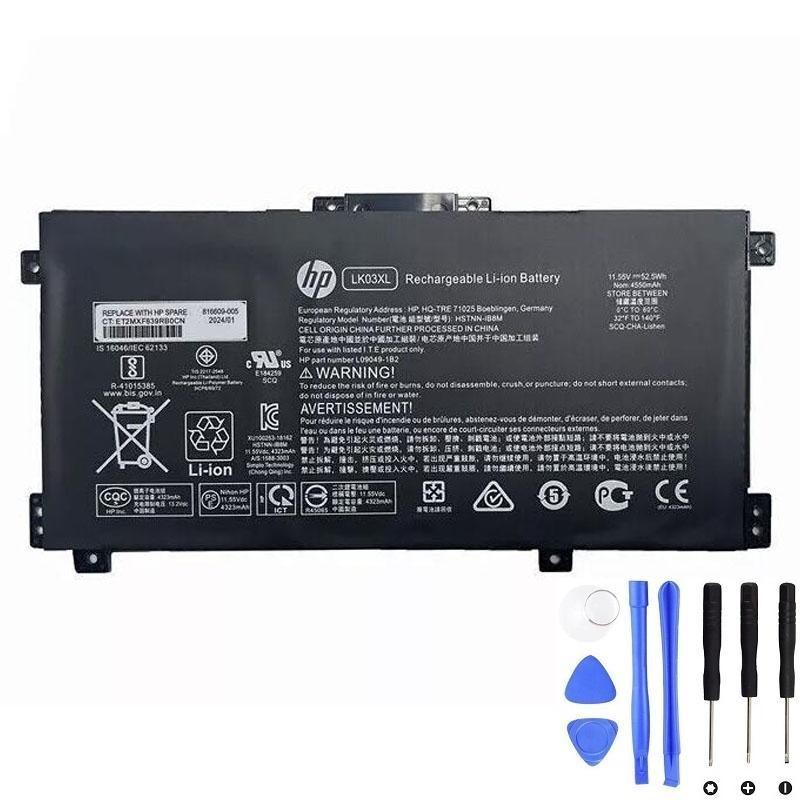
LK03XL battery family—often labeled on the sticker as
L09281-855, ASSY-BATT 3C 52Wh 4.55Ah, or LK03052XL-PR.
This guide shows you how to confirm compatibility, install the pack safely, fix common charging issues, and keep the new battery healthy.
Buy HP LK03XL 52.5Wh Battery →
Skip to Installation
At a glance
- Model focus: HP ENVY 17m-ce1013dx.
- Battery family: LK03XL internal 3-cell pack (a.k.a. L09281-855, LK03052XL-PR).
- Rating: ~52.5Wh, 4.55Ah, nominal ≈ 11.55V (3-series Li-ion).
- Mounting: Internal, screw-mounted; user-replaceable with care.
- What to match: Part number(s), voltage family (stated on your label), connector location, outline & screw holes.
How to confirm compatibility (ENVY 17m-ce1013dx)
- Power off & unplug the laptop.
- Remove the bottom cover (details below) to read your battery sticker.
- Confirm one of the following appears on the label: LK03XL, L09281-855, LK03052XL-PR, or wording like “Assembly-battery 3CELL 52Wh 4.55Ah Li”.
- Verify the nominal voltage family (~11.55V / 3S) on your original sticker; do not mix with 4-cell (15.2/15.4V) families.
- Compare connector position, cable orientation, outline & screw holes with the product photos.
Series names alone (“ENVY 17”) can span different packs; the sticker + physical layout is the source of truth.
Specs decoded (L09281-855 / LK03052XL-PR)
| Field on label | What it means | Why it matters |
|---|---|---|
| LK03XL | HP battery family/type | Ensures the right footprint, connector and screw pattern |
| L09281-855 | HP spare/assembly code | Used by parts catalogues; maps to LK03XL form |
| LK03052XL-PR | Assembly naming variant | Same pack class; check voltage and connector |
| 52–52.5Wh | Energy (Watt-hours) | Determines runtime (higher Wh = longer use, same V/fit) |
| 4.55Ah | Capacity (Amp-hours) | Combined with voltage gives Wh (≈11.55V × 4.55Ah ≈ 52.5Wh) |
| ≈11.55V | Nominal voltage (3-cell) | Must match your original voltage family |
HP original vs third-party: which should you buy?
| Aspect | HP OEM | Reputable third-party |
|---|---|---|
| Price | Higher | Usually lower |
| Specs | Exact by design | Verify V/connector/fit and warranty (≥12 months recommended) |
| Availability | May be limited on older SKUs | Often broader coverage |
| Risk | Low when sourced properly | Low–moderate; avoid no-spec “ultra-cheap” listings |
Takeaway: OEM is the lowest risk. A quality third-party LK03XL with clear specs & returns can be excellent value.
Step-by-step installation
- Shut down & discharge: Unplug AC; hold the power button for 10–15s to clear residual charge.
- Remove bottom cover: Track screw positions/lengths; use a plastic pick to release clips (avoid metal prying).
- Disconnect the battery: Pull the connector by its housing (not the wires). Peel back any securing tape gently.
- Swap packs: Unscrew the old LK03XL; lift out carefully; place the new pack; align holes; fasten evenly.
- Reconnect & reassemble: Fully seat the connector; close the chassis; reinstall screws; ensure no gaps.
- Power & verify: Connect AC; boot to Windows; confirm the battery is detected and charging.
If the old pack is swollen, stop. Do not pry or compress it—seek professional service.
After installation: battery report & BIOS tips
Generate a Windows battery report
- Open an elevated Command Prompt.
- Run
powercfg /batteryreportand open the generated HTML (path shown in the console). - Compare Design Capacity vs Full Charge Capacity; check Cycle Count and recent usage/standby drain.
Enable longevity-friendly charging
- In many HP models, BIOS → Battery Health Manager: choose a mode that reduces time at 100% when mostly on AC.
- Keep vents clear; avoid heavy workloads while charging to limit heat (battery’s #1 enemy).
“Plugged in, not charging” — quick fixes
- Adapter sanity check: Use a correct-wattage HP charger; inspect DC-in port/cable for debris or bent pins.
- Reseat the connector: Power down; reopen; firmly reseat the battery cable.
- Firmware & drivers: Update BIOS, chipset, and power management for your exact ENVY 17m-ce10xx SKU.
- Windows battery drivers refresh: Device Manager → Batteries → uninstall “Microsoft AC Adapter” and “Microsoft ACPI-Compliant Control Method Battery” → reboot.
- EC reset: With AC unplugged, hold the power button 10–15s; reconnect and test.
Persistent issues may indicate a DC-in jack or charging IC fault—have a technician diagnose.
Care, runtime & plugged-in habits
- Keep it cool: Use on hard surfaces; clean vents; don’t leave in a hot car.
- Avoid 100% + heat: That combo accelerates aging; prefer longevity modes if docked often.
- Calibration: Not routinely needed; if the gauge seems off, do one gentle cycle (~20–30% → 100%).
- Storage (weeks): Power down around 40–60% and store cool/dry; check every couple of months.
Safety, swelling, recycling & shipping
- Swelling/odor/idle heat: Power down immediately. Do not puncture, bend, or continue using a compromised pack.
- Recycle properly: Use local e-waste/battery collection or retailer take-back; never bin lithium batteries.
- Shipping: Lithium batteries are regulated; only ship undamaged, UN 38.3-compliant packs with proper packing/marking. Damaged/swollen batteries are prohibited.
FAQ
Are 3-cell (≈11.55V) and 4-cell (15.2/15.4V) packs interchangeable?
No. Always match the nominal voltage family shown on your original label.
Do I need to calibrate the new LK03XL battery?
Not routinely. After installation, let it reach 100% once while idle. If the gauge looks off later, do one gentle cycle (~20–30% → 100%). Avoid frequent deep 0–100% cycles.
How long will 52.5Wh last per charge?
It depends on workload, brightness, and background apps. Light office use can deliver many hours; heavy tasks (video, 3D, many tabs) reduce runtime.
Where can I buy the correct pack?
Here’s a listing with clear specs and images:
HP LK03XL 52.5Wh battery •
Full-size image.