Is your HP Envy x360 or Pavilion x360 losing charge too fast, shutting down early, or showing “Plugged in, not charging”? This guide helps you confirm compatibility with the LK03XL (≈52.5Wh, 3-cell), diagnose failures, and replace the battery safely—step by step.
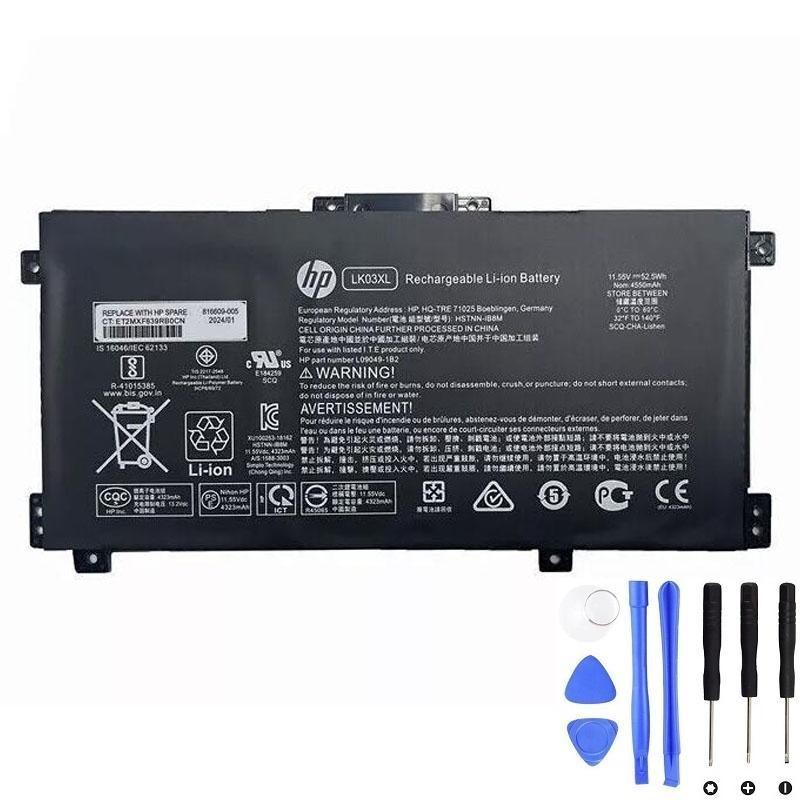
Buy the HP LK03XL (≈52.5Wh) Battery
- Designed for HP Envy x360 15/17 and Pavilion x360 15-cr families
- Replaces L09281-855 and the full list of HP spare/part numbers below
- Package includes 1× LK03XL battery, 2× screwdrivers, 1× instruction
- 30-day full refund · 1-year free exchange
Highlights (explicit references users often search): 15m-cn0012dx, 15m-cn0011dx, 15m-bp112dx, 15m-bp111dx, 15m-bq121dx, 15m-cn0xxx, 17m-ae0xx, 17-ae1xx, 17-bw0013dx, 916814-855, 916368-421, LK03XL/LKO3XL.
1) When It’s Time to Replace the Battery
- Runtime collapse: Drops from hours to minutes.
- Early shutdowns: Powers off at 20–60% remaining.
- Charging anomalies: “Plugged in, not charging”, LED blinking, level stuck.
- System warnings: HP diagnostics or Windows battery report flags “Replace”.
- Physical swelling signs: Bottom case bulge, hinge/touchpad stiffness—replace immediately.
2) Quick Diagnosis Checklist
Tick what you’ve observed. If you select 2 or more, replacement is strongly recommended.
3) Confirm Compatibility in 3 Steps
- Read your current battery label: Power off, unplug AC. Open bottom cover and check printed model: you should see LK03XL (sometimes written LKO3XL) or an HP spare like L09281-855.
- Note your notebook family & sub-SKU: e.g., Envy x360 15-bp/15-bq/15-cn/15m-cp, Envy x360 17-ae/17-bw/17-ce, or Pavilion x360 15-cr. Cross-check in the full lists below.
- Match both: Your battery spare number must appear in Replacement Part Numbers, and your notebook model in Full Compatible Models. If both match—this is the right battery.
4) Specifications & What’s in the Box
| Battery Model | LK03XL (a.k.a. LKO3XL) |
|---|---|
| Nominal Energy | ≈ 52.5Wh |
| Voltage / Cells | 11.55V · 3-cell Li-ion |
| Form Factor | Internal pack with cable/connector (screw-in) |
| In the Box | 1× LK03XL battery, 2× screwdrivers, 1× instruction |
| Fulfilment & Policy | Ships from US Warehouse · 60-day refund · 1-year exchange |
5) Replacement Part Numbers (Complete)
- LK03XL
- LKO3XL
- L09281-855
- 916814-855
- LK03048XL
- LK03055XL
- 916368-421
- 916368-541
- HSTNN-LB7U
- HSTNN-LB8J
- HSTNN-UB71
- HSTNN-UB7I
- L08855-856
- L08934-1B1
- L08934-2C1
- L09049-1B1
- L09280-855
- L09911-141
- L09911-421
- TPN-W127
- TPN-W128
- TPN-I129
6) Full Compatible HP Laptop Models (Grouped · Non-omitted)
The LK03XL is widely used across HP Envy x360 (15-inch & 17-inch) and Pavilion x360 15-cr families. We’ve grouped everything you provided for readability and search.
Envy x360 — 15-bp / 15m-bp Series
- 15-bp0xx, 15-bp1xx, 15m-bp0xx, 15m-bp1xx, 15m-bp000, 15m-bp011dx, 15m-bp012dx, 15m-bp111dx, 15m-bp112dx
- 15-bp143cl, 15-bp152wm, 15-bp194cl, 15-bp165cl, 15-bp112dx, 15-bp152nr
- 15-bp001tx, 15-bp002tx, 15-bp003tx, 15-bp004tx, 15-bp005tx, 15-bp006tx, 15-bp100tx, 15-bp101tx, 15-bp102tx, 15-bp103tx, 15-bp104tx, 15-bp105tx, 15-bp106tx, 15-bp107tx, 15-bp013tx
- 15-bp103ur, 15-bp003nx, 15-bp004na, 15-bp101nia, 15-bp195nia, 15-bp102ng, 15-bp109ur, 15-bp030nd, 15-bp104nw, 15-bp131ng
Envy x360 — 15-bq / 15m-bq Series
- 15-bq0xx, 15-bq1xx, 15-bq100, 15-bq200, 15m-bq0xx, 15m-bq1xx
- 15m-bq121dx, 15m-bq021dx, 15m-bq100, 15z-bq100, 15z-bq200
- 15-bq000nb, 15-bq001na, 15-bq000no, 15-bq000ur, 15-bq001nb, 15-bq213cl, 15-bq150na, 15-bq075nr
Envy x360 — 15-cn / 15m-cn / 15t-cn Series
- 15-cn0xxx, 15-cn1xxx, 15m-cn0xxx, 15m-cn1xxx, 15t-cnxxx, 15t-cn000, 15t-cn100
- 15-cn0013nr, 15-cn1025cl, 15-cn1035cl, 15-cn1055cl, 15-cn1073wm
- 15-cn0000tu, 15-cn0000tx, 15-cn0001la, 15-cn0001na, 15-cn0001tu, 15-cn0001tx, 15-cn0002tu, 15-cn0002tx
- 15-cn0003ca, 15-cn0003tu, 15-cn0003tx, 15-cn0004tu, 15-cn0004tx, 15-cn0005tu, 15-cn0005tx, 15-cn0006tu, 15-cn0006tx, 15-cn0007tu, 15-cn002la
- 15m-cn0011dx, 15m-cn0012dx, 15-cn0000ne, 15-cn0001ng, 15-cn0003ng
Envy x360 — 15m-cp / 15z-cp Series
- 15m-cp0xxx, 15m-cp0011dx, 15m-cp0012dx (listed twice in source; consolidated), 15z-cp000, 15z-cp0xxx
- 15-cp0053cl, 15-cp0000na, 15-cp0000nc, 15-cp0005ng, 15-cp0013nr, 15-cp0014au, 15-cp0599na
Envy x360 — 17-ae / 17m-ae / 17t-ae Series
- 17-ae0xx, 17m-ae0xx, 17-ae1xx, 17m-ae1xx, 17m-ae011dx, 17m-ae111dx, 17m-ae011xx, 17t-ae000, 17t-ae100
- 17-ae110nr, 17-ae151nr, 17-ae001nf, 17-ae006ng, 17-ae107nb, 17-ae003ng, 17-ae004ng, 17-ae005ng, 17-ae007ng, 17-ae009ng
- 17-ae030ng, 17-ae031ng, 17-ae100, 17-ae101ng, 17-ae102ng, 17-ae103ng, 17-ae120nd, 17-ae130ng, 17-ae131ng, 17-ae140ng, 17-ae141ng, 17-ae142ng, 17-ae143ng
- 17-ae165nr, 17-ae120nr, 17-ae001nia, 17-ae011nc, 17-ae101ns, 17-ae102nw, 17-ae155cl
Envy x360 — 17-bw / 17m-bw / 17t-bw Series
- 17-bw0xxx, 17m-bw0xxx, 17t-bw0xx, 17t-bw000, 17m-bw0013dx
- 17-bw0000na, 17-bw0003ca, 17-bw0008ca, 17-bw0011nr, 17-bw0503na, 17-bw0707nz
- 17-bw0001ng, 17-bw0004na, 17-bw0006nf, 17-bw0012nf, 17-bw0001nc, 17-bw0001ni, 17-bw0007ur
- 17-bw0200nz, 17-bw0003ng, 17-bw0706nz, 17-bw0999na, 17-bw0013dx
Envy x360 — 17-ce / 17m-ce / 17t-ce Series
- 17-ce0xxx, 17m-ce0xxx, 17t-ce0xx, 17t-ce000, 17t-ce100, 17-ce1xxx, 17m-ce1xxx, 17t-ce200
- 17-ce0002ca, 17-ce0003ca, 17-ce0008ca, 17-ce0015nr, 17-ce1031nr, 17m-ce0013dx, 17m-ce1013dx
Pavilion x360 — 15-cr Series
- 15-cr0xxx, 15-cr0037wm, 15-cr0006tx, 15-cr0052od, 15-cr0160nb, 15-cr0051od, 15-cr0091ms, 15-cr0035nr, 15-cr0053wm, 15-cr0087cl
- 15-cr0013nq, 15-cr0014nq, 15-cr0015nq, 15-cr0017nr, 15-cr0023nq, 15-cr0027nq, 15-cr0031nq, 15-cr0033nq
- 15-cr0051cl, 15-cr0055od, 15-cr0056wm, 15-cr0060nia, 15-cr0062st, 15-cr0064st, 15-cr0070nb
- 15-cr0075nr, 15-cr0076nr, 15-cr0077nr, 15-cr0078nr, 15-cr0079nr
- 15-cr0081cl, 15-cr0083cl, 15-cr0085cl, 15-cr0088cl, 15-cr0095nr
- 15-cr0100ng, 15-cr0130nd, 15-cr0149nb, 15-cr0161nb, 15-cr0163nb, 15-cr0211ng, 15-cr0216ng
7) Safe Replacement Steps (Typical Envy x360 / Pavilion x360)
Tools: Phillips #0/#00 screwdriver, plastic spudger, ESD strap recommended.
- Shut down the laptop fully and unplug AC. Work on a static-safe surface.
- Remove the bottom cover: Unscrew all base screws. Some models hide screws under the rear feet or rubber strips—peel gently. Pry around edges using a plastic spudger.
- Disconnect the battery cable from the motherboard by pulling horizontally on the connector housing.
- Unscrew and lift the old battery (keep screws for re-use).
- Install the new LK03XL: Align, screw in evenly (don’t overtighten), reconnect the cable fully.
- Reassemble the bottom cover and screws. Reconnect AC and power on.
- If BIOS/UEFI shows battery or intrusion messages, acknowledge/clear and continue to Windows.
Safety note: If you suspect swelling, avoid pressing on the palmrest or touchpad; remove the pack promptly and dispose according to local e-waste rules.
8) Post-Install Calibration & Care
- Charge to 100% and keep charging for 30–60 minutes.
- Use on battery to ~10–15%, then recharge to 100%. Repeat 1–2 times so Windows relearns capacity.
- For longevity, avoid high heat and constant 100% under heavy load; ensure good ventilation.
9) Quick FAQ
Is 52.5Wh a capacity upgrade or like-for-like?
It’s the typical capacity for LK03XL. Real-world runtime depends on your CPU/iGPU load, brightness, and background apps.
My label says LKO3XL. Is that the same as LK03XL?
Yes—both spellings are used on some labels and listings. Match with the spare numbers and model list above.
Which families does LK03XL cover?
HP Envy x360 15-bp/bq/cn/cp, Envy x360 17-ae/bw/ce, and Pavilion x360 15-cr (see the non-omitted full list above).