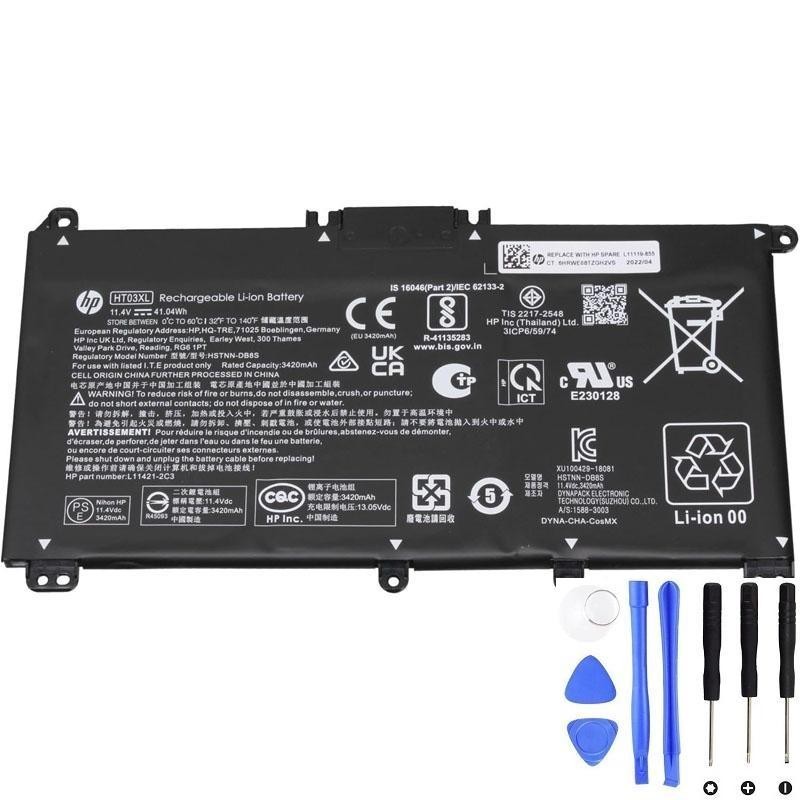
If your HP 15-da0014dx is shutting down unexpectedly, refusing to charge, or reporting “Battery Not Detected,” it’s likely time to replace the internal pack.
This guide covers diagnosis, safety, and a professional, step-by-step replacement procedure using the correct part family:
- HP Part:
L11119-855 - Assembly Label:
ASSY-BATT 3C 41W 3.6A LI HT03041XL-PR+PL - Common Name:
HT03XL(≈ 41.04 Wh, 3-cell)
Verified purchase link (external):
HT03XL 41.04Wh Battery for HP
.
Table of Contents
- Symptoms & Quick Checks
- Compatibility & Part Numbers
- Tools & Safety
- Replacement Procedure
- Post-Replacement Steps
- FAQ
1) Symptoms & Quick Checks
- Battery drains fast / won’t hold charge even after a full night on AC.
- “Plugged in, not charging” or “Battery not detected” in Windows.
- Unexpected shutdowns at 20–50% indicated charge.
- Battery report: In Windows PowerShell, run
powercfg /batteryreportto check cycle count and design vs. full charge capacity. - Perform an AC adapter sanity check: confirm the charger LED and output; boot briefly on AC only to rule out adapter issues.
2) Compatibility & Part Numbers
The HP 15-da0014dx (part of the 15-da family) uses the 3-cell internal battery commonly referenced as HT03XL.
On genuine assemblies you may see one or more of the following on the label:
L11119-855ASSY-BATT 3C 41W 3.6A LI HT03041XL-PR+PLHT03XL(≈ 41.04 Wh)
When sourcing a replacement, match these identifiers. Avoid packs that omit safety markings or lack proper protections (PTC/NTC, cell balancing BMS).
3) Tools & Safety
Tools
- Phillips #0 screwdriver
- Plastic spudger / guitar pick
- ESD wrist strap (recommended)
- Small container for screws
Safety & Prep
- Shut down Windows fully (not sleep/hibernate).
- Unplug AC and press power 15 seconds to discharge residual power.
- Work on a non-conductive surface; avoid metal tools on connectors.
- If the old battery is swollen, do not puncture it; replace immediately.
4) Replacement Procedure
-
Remove bottom cover screws.
With the laptop closed and upside down, remove all visible Phillips screws. Some 15-da units have screws hidden beneath the front rubber feet or stickers—inspect carefully.
-
Release the bottom cover clips.
Insert a plastic pick along a side seam and gently work around the perimeter. Avoid bending the cover; slow and even pressure prevents clip damage.
-
Locate the battery pack.
The battery is a flat 3-cell pack secured with several Phillips screws and connected via a multi-pin board connector.
-
Disconnect the battery cable.
Before removing screws, grasp the battery cable by its tab/plug (not the wires) and pull horizontally out of the motherboard socket.
-
Remove the battery screws and lift out the pack.
Keep screws organized. Lift the battery out from the non-cabled side to avoid stressing the connector area.
-
Install the new battery (HT03XL / L11119-855).
Seat the pack flat, align holes, and reinstall screws finger-tight first; then snug them. Reconnect the cable fully—an incomplete insert may cause “Not Detected.”
-
Reassemble the bottom cover.
Press along edges to re-engage clips, then reinstall all screws. If any were hidden under feet, re-adhere the feet.
-
First boot and firmware checks.
- Power on and enter BIOS/UEFI (Esc/F10 on HP) to verify the battery is recognized.
- In Windows, confirm charging begins and check Device Manager → Batteries for errors.
Buy the HT03XL (L11119-855) Battery
5) Post-Replacement Steps (Calibration & Care)
- Calibrate: Charge to 100%, keep on AC for 30–60 minutes, then use on battery to ~10–15%, and recharge to 100%. This helps the fuel gauge learn true capacity.
- Update BIOS: Check HP Support for your exact 15-da model; newer BIOS can improve charging behavior and fan curves.
- Windows Battery Report: Regenerate
powercfg /batteryreportafter a few cycles to verify normal wear and stable full-charge capacity. - Storage tips: If shelving the laptop for weeks, leave the battery around 50–60% and power it on monthly to avoid deep discharge.
- Disposal: Recycle the old pack at an authorized e-waste or battery drop-off. Do not trash or incinerate.
FAQ
Is HT03XL the correct battery for HP 15-da0014dx?
Yes. The 15-da0014dx uses the 3-cell HT03XL family. Common labels you may see include L11119-855 and ASSY-BATT 3C 41W 3.6A LI HT03041XL-PR+PL.
My new battery says 41.04Wh but my old one reports a different value. Is that normal?
Minor differences are normal due to reporting granularity and temperature. What matters is that it’s an HT03XL-class 3-cell pack for the 15-da series.
The laptop still shows “Plugged in, not charging.” What now?
- Confirm the battery cable is fully seated.
- Shut down, disconnect AC, hold power 15 seconds, then boot and retest.
- Install the latest BIOS/UEFI and chipset drivers.
- Try a known-good HP-rated AC adapter.
Do I need thermal paste or tape for this job?
No. This is a battery-only service—no heatsink removal is required.
How long does the swap take?
For an experienced technician, typically 15–30 minutes, not including calibration.
Purchase the Correct Battery
We recommend sourcing from reputable vendors. Here’s a verified listing for the exact part family: