Replace the Battery on Lenovo LOQ Essential 15IRX11 (Type 83SC)
Skill level: Easy–Moderate | Time: ~20–30 minutes | Goal: Remove the old pack and install a new one (e.g., model L25B4PK0).
Before you start
- Shut down Windows completely (don’t use Sleep/Hibernate).
- Unplug the AC adapter and all peripherals.
- Work on a clean, static-safe surface; use an anti-static strap if available.
- Tools: small Phillips screwdriver, plastic pry tool (guitar pick), tweezers (optional).
Step 1 — Remove the lower case
- Place the laptop upside down on a soft surface.
- Remove the bottom screws securing the lower case.
- Starting from a corner, insert a plastic pry tool into the seam and gently release the latches around the edges.
- Lift off the lower case and set it aside.

Step 2 — Disconnect and remove the battery
- Locate the battery pack. Disconnect the battery cable from the system board by pulling the connector straight out of the socket (use a fingernail or plastic tool—don’t pull the wires).
- Remove the screws holding the battery to the chassis.
- Lift the battery out of the laptop.

Attention: Avoid shorting contacts. Handle the pack by its edges. If the connector feels tight, rock it gently while pulling straight out.
Step 3 — Install the new battery
- Place the new battery into the bay and align it with the standoffs.
- Reinstall and tighten the battery screws evenly (do not overtighten).
- Reconnect the battery cable to the system board and ensure it is fully seated and level.
Step 4 — Refit the lower case
- Position the lower case over the chassis and press along the edges to engage all latches.
- Reinstall the bottom screws.
Step 5 — Power up & verify
- Reconnect the AC adapter and power on the laptop.
- In Windows, confirm the battery is detected and charging.
- Optional calibration: Charge to 100%, keep plugged in for 1–2 hours, then use on battery down to ~10–15% and recharge to 100%.
Recommended Replacement Battery
For a guaranteed fit on Lenovo LOQ Essential 15IRX11 (Type 83SC), we recommend the battery below:
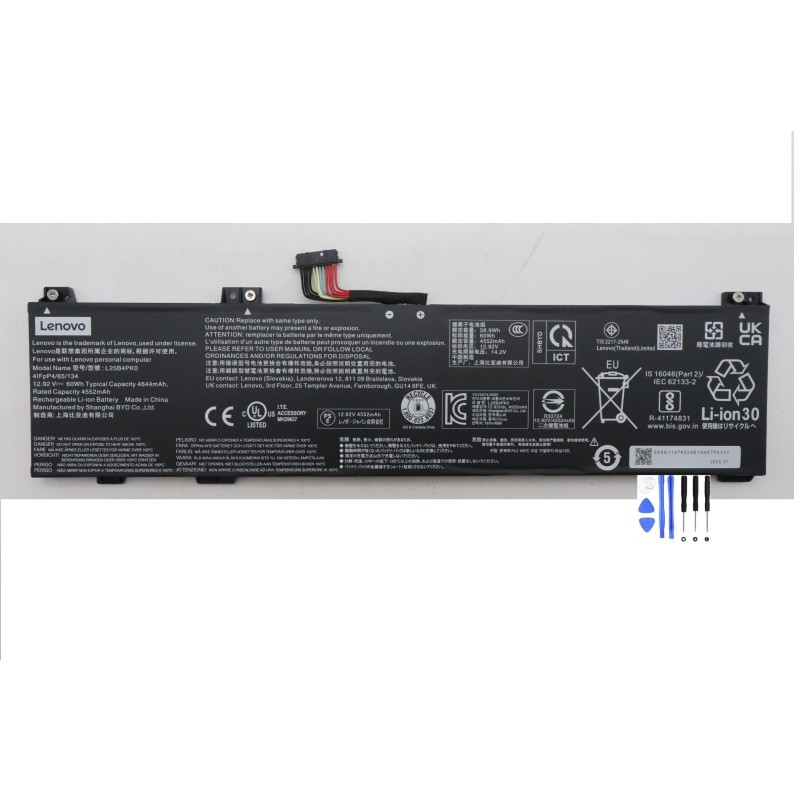
Lenovo L25B4PK0 Battery (60Wh)
- Compatible laptop: LOQ Essential 15IRX11 — Type 83SC
- Battery pack model: L25B4PK0
- Part numbers: 5B11S76523, 5B11S76524
- Cell/pack designation (IEC): 4ICP4/65/134
- Typical spec (from OEM label): 60 Wh • 12.92 V • 4644 mAh (typ.)