HP HT03XL (L11119-855) Battery Dead? Here’s What You Need to Know
If your HP Pavilion laptop suddenly refuses to hold a charge, shuts off when unplugged, or shows 0% battery no matter how long it charges, chances are the HT03XL (L11119-855) battery has reached the end of its life. This guide covers common symptoms, diagnosis, and safe replacement steps.
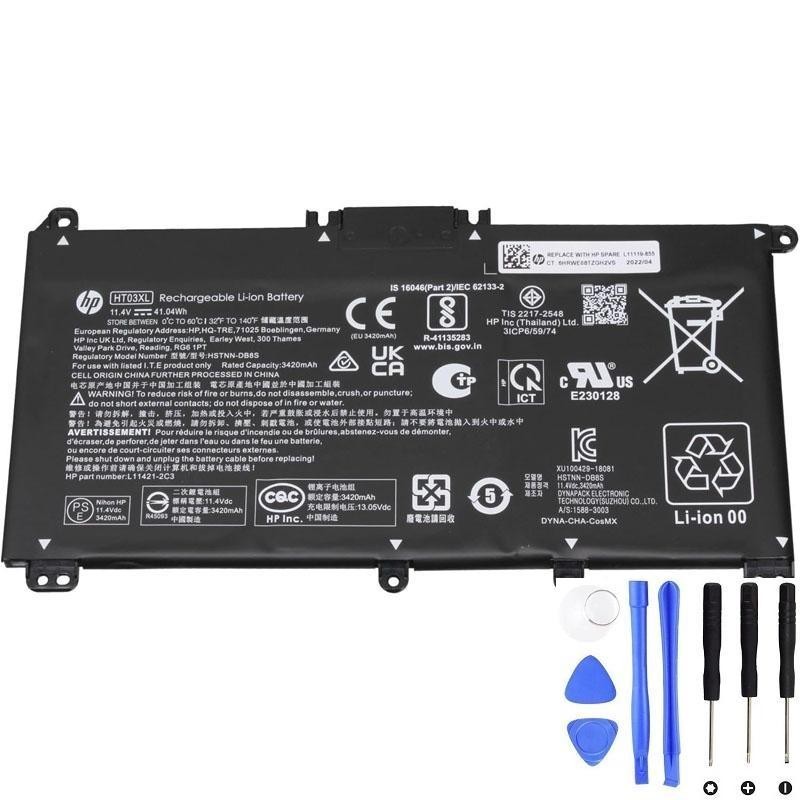
Quick Answer: If your laptop works only when plugged in, replacing the internal battery is the solution. The HT03XL (L11119-855) is the correct replacement for many HP Pavilion 14, 15, and 17 series laptops.
Symptoms of a Dead Battery
- Laptop powers off instantly when unplugged.
- Battery stuck at 0% or never charges beyond a certain percentage.
- Sudden shutdowns even with charge remaining.
- Battery health report shows very low capacity compared to design capacity.
About the HT03XL (L11119-855) Battery
| Model | HT03XL |
|---|---|
| Part Number | L11119-855 |
| Cells | 3-cell Lithium-ion |
| Capacity | Approx. 41 Wh |
| Voltage | ~11.55 V |
| Common Use | HP Pavilion 14 / 15 / 17 series laptops |
How to Confirm Your Battery Model
Turn off your laptop, remove the bottom cover, and check the label on the battery. If it says HT03XL or L11119-855, you’ve found the correct replacement.
Steps to Replace the Battery
- Power off the laptop and unplug the charger.
- Remove the screws and carefully take off the bottom cover.
- Disconnect the battery connector from the motherboard.
- Unscrew and remove the old battery.
- Insert the new HT03XL battery, reconnect it, and secure it with screws.
- Reattach the bottom cover and fully charge the new battery before first use.
Important: If the old battery looks swollen, do not press or puncture it. Handle carefully and dispose of it safely at a recycling facility.
Battery Care Tips After Replacement
- Charge to 100% and keep it plugged in for an extra hour the first time.
- Avoid draining the battery completely to 0% too often.
- Use the laptop on battery occasionally to keep the cells active.
Final Recommendation
The most reliable fix for HP laptops showing these symptoms is replacing the battery with a new HT03XL (L11119-855). It’s a cost-effective way to extend the life of your device without replacing the entire laptop.