The HP 15-dy2xxx is a practical 15.6-inch Windows notebook family built for school, home, and light office work. This guide keeps things simple: how to identify your exact sub-model, what to expect in day-to-day use, which upgrades make the biggest difference, and how to replace the battery safely. We also link to a compatible, ready-to-install HT03XL 41.04Wh replacement.
Buy HT03XL 41.04Wh Battery
Jump to sections ↓
Tip: 15-dy2xxx is an umbrella for many sub-models (dy2xxx = dy2000–dy2xxx). Always verify your exact SKU before buying parts.
What the HP 15-dy2xxx family covers
The “15-dy2xxx” naming indicates you’re looking at a modern 15.6″ HP 15 series built for reliability, long battery life, and a slim, budget-friendly chassis. Across sub-models you’ll find a range of CPUs, RAM/storage options, and display panels. That flexibility is great—but it also means parts can differ by SKU, which is why confirming your exact model number matters.
How to identify your exact sub-model (SKU/Part)
You shared the following HP 15-dy2xxx part/SKU numbers that appear in retail listings, labels, or the box:
| Part/SKU | Notes |
|---|---|
| 525W1UAR | Retail configuration within 15-dy2xxx family |
| 7H2X8UAR | Retail configuration within 15-dy2xxx family |
| 525W1UA | Retail configuration within 15-dy2xxx family |
| 729T3UA | Retail configuration within 15-dy2xxx family |
| 729T5UA | Retail configuration within 15-dy2xxx family |
| 729T7UA | Retail configuration within 15-dy2xxx family |
| 729T8UA | Retail configuration within 15-dy2xxx family |
| 72G60UA | Retail configuration within 15-dy2xxx family |
| 729U0UA | Retail configuration within 15-dy2xxx family |
| 7H2X8UA | Retail configuration within 15-dy2xxx family |
To confirm yours in Windows: press Win+R → type msinfo32 → System Model. Or check the bottom label for the SKU. HP Support Assistant can also auto-detect it.
Everyday experience & quick optimization
What it’s good at
- Web browsing, office docs, email, and remote learning apps
- 1080p streaming and casual multitasking
- Light photo edits and classroom software
Quick wins
- Keep Windows and drivers updated (HP Support Assistant helps).
- Trim startup apps to speed boot and extend battery life.
- Use “Battery saver” on the go; “Balanced” when plugged in.
For heavier creative apps or gaming, consider adding RAM (if available) and ensuring your storage is a fast NVMe SSD.
Upgrade paths (storage & memory)
Most HP 15-dy2xxx configurations use an M.2 SSD for primary storage and include at least one memory slot. However, exact slot counts and limits vary by sub-model. Before buying parts, check your maintenance guide or open the bottom cover to visually verify what’s installed.
- Storage: Upgrading to a higher-capacity NVMe SSD brings the biggest day-to-day boost (faster boots, launches, and file work).
- Memory: If your model supports it, moving to dual-channel memory can noticeably improve responsiveness in multitasking.
Battery compatibility & replacement (HT03XL 41.04Wh)
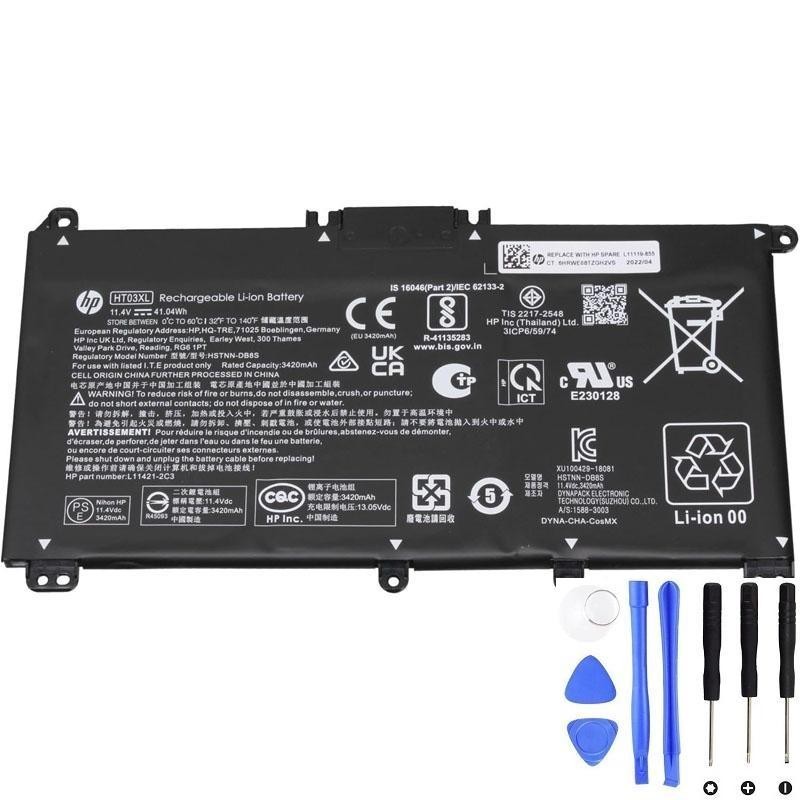
Many 15-dy2xxx laptops ship with an internal battery commonly referenced as HT03XL (~41.04Wh). If your battery health has dropped or the laptop dies quickly without AC, a replacement is the most effective fix.
How to confirm your battery model
- Battery label: Power off, remove AC, open the bottom cover carefully and read the printed model on the pack (look for HT03XL).
- HP Support / BIOS: Use HP Support Assistant or check BIOS battery info to corroborate the part family.
- Match voltage/Wh: Ensure the Wh rating matches your original; small tolerance differences are normal across batches.
Safe replacement steps (summary)
- Shut down and unplug the laptop. Work on a clean, static-safe surface.
- Remove the bottom cover screws and carefully release clips around the edges.
- Disconnect the battery cable from the board before lifting the pack.
- Install the new HT03XL 41.04Wh pack, align and screw down per the original layout.
- Reconnect the cable, reassemble the cover, and perform one or two charge/discharge cycles to help calibration.
Buy the compatible battery
We stock a ready-to-install HT03XL 41.04Wh battery that matches this guide.
HP HT03XL 41.04Wh Battery — View & Buy
Still unsure? Send us your sub-model (e.g., 729T3UA) and a photo of the original battery label—we’ll verify before you purchase.