Short answer: For most HP laptops that are functionally sound and less than 5–6 years old, a battery replacement is one of the highest-ROI repairs you can make. You restore portability, improve reliability, and extend service life at a fraction of the cost of a new machine. It’s usually not worth it if the laptop also needs major work (motherboard, display, hinge) or if performance is too far behind your current needs.
Quick Decision Checklist
- Overall health is good? No critical board/display issues, thermals under control, storage healthy.
- Performance fits your workload? CPU/RAM are adequate for how you actually use the laptop.
- Battery is the main problem? Rapid drain, “Plugged in, not charging,” unexpected shutdowns.
- Replacement pack available? Genuine or quality aftermarket pack with matching HP part numbers.
What You Gain by Replacing the Battery
- Restored portability: 2–6+ hours of unplugged time depending on model and capacity.
- Stability: Prevents sudden power loss that can corrupt files or SSD state.
- Performance consistency: Some models throttle on weak batteries; a healthy pack sustains turbo on the go.
- Longevity & sustainability: Extends useful life and reduces e-waste.
Identify Your Exact HP Model (Model Name, Product Number, Serial)
Before buying a battery, capture these three identifiers—HP’s parts system is precise:
- Model Name: e.g.,
HP 15-da0014dx,HP Envy x360 13-ay0xxx - Product Number (SKU): looks like
4BS54UA#ABA - Serial Number (S/N)
Fastest Ways on Windows
- System Information: Press Win → type
msinfo32→ open System Information → check System Model. - PowerShell (accurate model ID): Right-click Start → Windows PowerShell (Admin) → run:
Get-CimInstance Win32_ComputerSystemProduct | Select-Object -Property Name, Vendor, Version, UUID
- HP Support Assistant / HP PC Hardware Diagnostics: HP’s tools show Product Number and Serial in their About or System Information sections.
- Physical labels: Flip the laptop (power off) and check the bottom shell or under the battery door (on older models) for Product No. and S/N.
- UEFI/BIOS screen: On boot, tap Esc then F1 or F10 → System Information (lists Product Number & Serial).
Use HP PartSurfer to Confirm the Official Battery Part Number
HP PartSurfer is HP’s official database for spare parts. It’s the best way to confirm the exact battery part number your unit shipped with (and compatible alternates).
Step-by-Step (2 minutes)
- Open partsurfer.hp.com.
- Search using Product Number (e.g.,
4BS54UA#ABA) or Serial Number. Model names (like15-da0014dx) also work but P/N is most precise. - Open your device page → find the System Parts / Battery category.
- Note the HP Spare / Assembly number for the battery. Example formats:
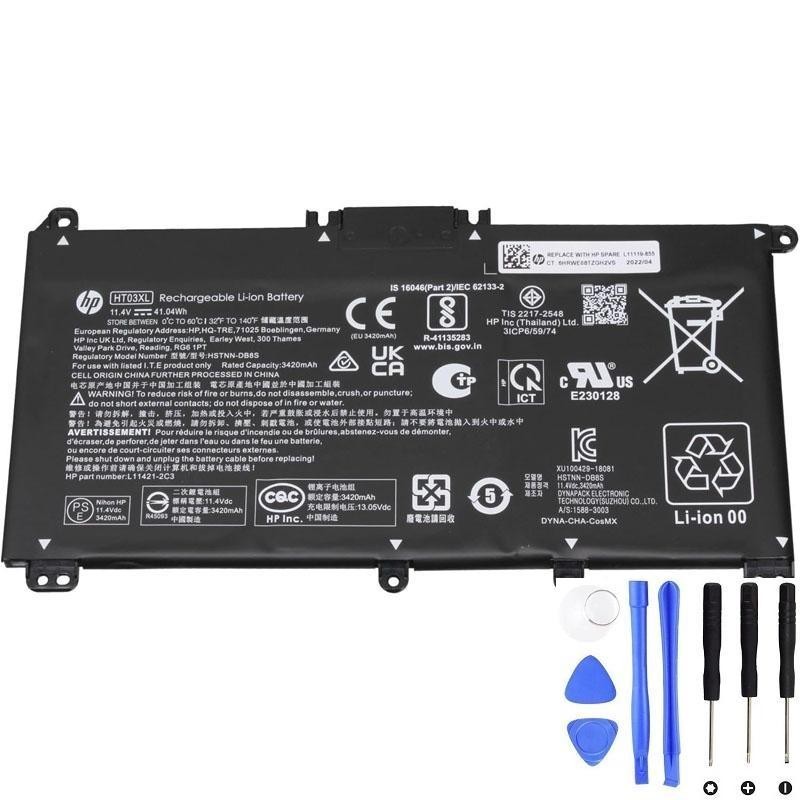
L11119-855(HP spare)HT03XL(battery family/model)- Label strings like
ASSY-BATT 3C 41W 3.6A LI HT03041XL-PR+PL
Copy these numbers—they are your ground truth when buying a replacement.
Find & Buy the Correct Battery
With the HP part number in hand, you can shop confidently. We recommend starting with a reputable parts retailer:
- Browse HP batteries: upgrade-my-laptop.com → Battery for Laptop
How to Use the Retailer Page Efficiently
- Open the category page above.
- Use the site’s search bar to paste your HP spare number (e.g.,
L11119-855) or family (e.g.,HT03XL). - Open the product page that matches your identifiers and review:
- Compatibility list (includes your model or product number)
- Electrical rating (Wh / V / mAh close to PartSurfer’s spec)
- Connector & outline (matches your original battery photos)
- Optional: If you’re working on an
HP 15-da0014dx, an example HT03XL listing is here:
HT03XL 41.04Wh Battery (L11119-855).
DIY vs. Professional Service
DIY Makes Sense If…
- Screw-on bottom cover, plug-in battery connector (no glue over cells).
- You have a #0/#00 Phillips, plastic spudger, ESD awareness.
- Correctly labeled pack available (matches PartSurfer’s spare number).
Choose a Pro If…
- Battery is glued beneath flex cables or speakers (common in ultrabooks).
- There’s swelling, bent frames, or torn connectors.
- You want parts/labor warranty and certified disposal.
Check Battery Health (Windows)
- Press Win + X → Windows PowerShell (Admin).
- Run:
powercfg /batteryreport→ open the HTML report. Compare Design Capacity vs. Full Charge Capacity and check cycle count. - Optional: At boot, tap F2 to run HP PC Hardware Diagnostics → Battery Test.
Safety, Warranty & Environmental Notes
- Power down fully (not Sleep), unplug AC, hold power 15 seconds to discharge before opening.
- ESD care: Use a strap or touch ground; never pry a swollen pack.
- Warranty: Opening may affect coverage; check your HP warranty status and service guide first.
- Recycle: Take the old battery to an authorized battery recycler; never dispose in household trash.
Bottom Line
If your HP laptop still meets your performance needs and the battery is the weak link, replacement is usually worth it. Confirm the correct spare number on HP PartSurfer, then buy a matching, well-labeled pack from a reputable retailer to maximize safety, fit, and lifespan.